This time we’re going bigger than ever. Fabric, Power BI, SQL, AI and more. We're covering it all. You won't want to miss it.
Learn moreLevel up your Power BI skills this month - build one visual each week and tell better stories with data! Get started
I have the following data:-
table name
program code
patient count
date
and I am trying to create a report in the following format
tablename program code 1/1/2019 (date) 2/2/2019 (date) --> Headers
abc(table_name) xyz (program code) 100 (patient count ) 200(patient count) ---> Values
I am unable to display the program code as a differentcolumn when I use matrix, since values for only one row is displayed.
Solved! Go to Solution.
Hi @Anonymous,
tablename program code 1/1/2019 (date) 2/2/2019 (date) --> Headers
abc(table_name) xyz (program code) 100 (patient count ) 200(patient count) ---> Values
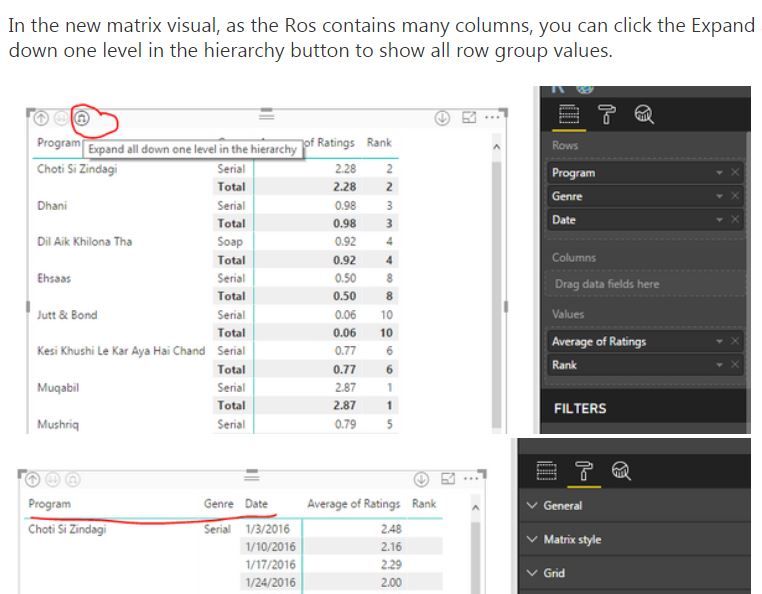
To achieve above output, you just need to place [tablename] and [program code] into Matrix row, place [date] into columns and place [patient count] into values section.
I cannot understand what you said "I am unable to display the program code as a differentcolumn when I use matrix, since values for only one row is displayed.", please illustrate with sample data.
Regards,
Yuliana Gu
I had to do this to make it work:-
Check out the April 2026 Power BI update to learn about new features.
Sign up to receive a private message when registration opens and key events begin.
If you have recently started exploring Fabric, we'd love to hear how it's going. Your feedback can help with product improvements.
| User | Count |
|---|---|
| 39 | |
| 28 | |
| 27 | |
| 22 | |
| 18 |
| User | Count |
|---|---|
| 67 | |
| 37 | |
| 32 | |
| 26 | |
| 25 |