Share feedback directly with Fabric product managers, participate in targeted research studies and influence the Fabric roadmap.
Sign up nowGet Fabric certified for FREE! Don't miss your chance! Learn more
hi
im working on making my tables partially depentent on a parameter
so the normal sql in advanced editor looks like this
let
Source = Sql.Database(SQLServerName, DatabaseName),
#"dbo_CRONUS JetCorp UK$Customer" = Source{[Schema="dbo",Item="CRONUS JetCorp UK$Customer"]}[Data]
in
#"dbo_CRONUS JetCorp UK$Customer"
and it work fine, then i would like to add a parameter for the "CRONUS JetCorp UK in the item part, because i also have a US version.
so for that i made a sql like this
let
Source = Sql.Database(SQLServerName, DatabaseName),
#"dbo_CRONUS JetCorp UK$Customer" = Source{[Schema="dbo",Item=(#"Company Name")&"Customer"]}[Data]
in
#"dbo_CRONUS JetCorp UK$Customer"
but it does not work 😕
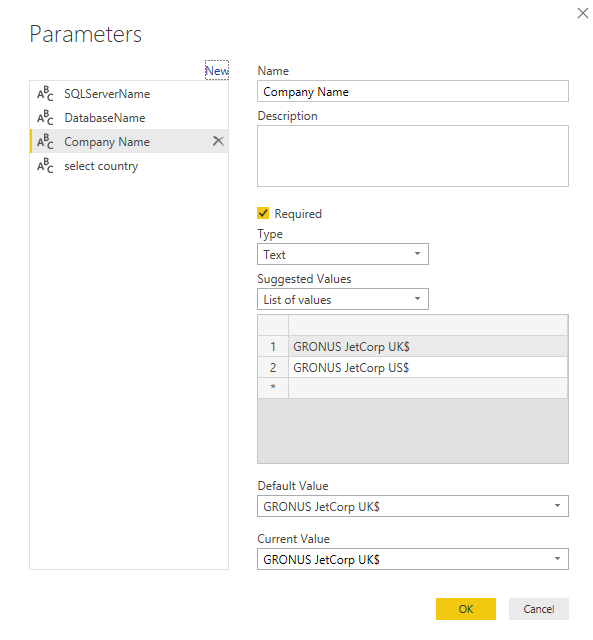
my parameter is setup like this
hope one of you can help, because i cant seem to find the answer.
Solved! Go to Solution.
@Anonymous Not able to replicate the error. Tried the same and working fine. Please post any error that you are facing after changing the table name in the parameter (which is Company Name in your case).
Proud to be a PBI Community Champion
Hej
in my advanced editor i have this sql
let
Source = Sql.Database(SQLServerName, DatabaseName),
#"dbo_CRONUS JetCorp UK$Customer" = Source{[Schema="dbo",Item="CRONUS JetCorp UK$Customer"]}[Data]
in
#"dbo_CRONUS JetCorp UK$Customer"
so i have created a parameter, and my end result should look something like this
let
Source = Sql.Database(SQLServerName, DatabaseName),
#"dbo_CRONUS JetCorp UK$Customer" = Source{[Schema="dbo",Item=(#"Company Name")&"Customer"]}[Data]
in
#"dbo_CRONUS JetCorp UK$Customer"
so i dont need to tell power bi everytime what company the table comes from, but that this is a parameter, and then the tabels name??
i dont seem to find any answers when googleling this, hope you guys can help.
@Anonymous Not able to replicate the error. Tried the same and working fine. Please post any error that you are facing after changing the table name in the parameter (which is Company Name in your case).
Proud to be a PBI Community Champion
thank you for your answer, and you are correct i can actually see that i made a spelling mistake and my original solution actually did work, so i have you to thank for, that my method was right and therefore something else was wrong.
If you love stickers, then you will definitely want to check out our Community Sticker Challenge!
Check out the January 2026 Power BI update to learn about new features.
| User | Count |
|---|---|
| 61 | |
| 58 | |
| 45 | |
| 21 | |
| 18 |
| User | Count |
|---|---|
| 122 | |
| 119 | |
| 37 | |
| 35 | |
| 29 |