cancel
Showing results for 
Search instead for 
Did you mean: 

Join the FabCon + SQLCon recap series. Up next: Power BI, Real-Time Intelligence, IQ and AI, and Data Factory take center stage. All sessions are available on-demand after the live show. Register now

Reply
Anonymous
Not applicable

not getting the right count using countrows

I'm using a measure to count the number of rows in a column "Parked at School" that is a "Y". What is happening is the card visualization is showing a much higher number than the actual. If I click on the card, instead of 1 it display 12. It's as if it's counting it by number of Active Date and not by the Parked at School data! I've been on this since last week and can't find a way how to get the true count. Can someone take a look and see what could be wrong? I appreciate it.

# school bus at school =
IF(ISBLANK([School Bus]),0,COUNTROWS(FILTER(VALUES('School Data'),[Parked at School]="Y")))


Active DateDriver NameParked at SchoolNumber of School Bus
11/1/2019Joe DoeN1
12/31/2019Tom JonesY2
1/1/2020Mary JonesY1
2/1/2020Tim JonesN1
3/1/2020**bleep** BrownY1
4/1/2020May BrownN1
5/1/2020Joe BrownY1
6/1/2020   
7/1/2020   
8/1/2020   
9/1/2020   
10/1/2020   
11/1/2020   
12/1/2020   
Total8Y8
5 REPLIES 5
Icey
Community Support
Community Support

Hi @Anonymous ,


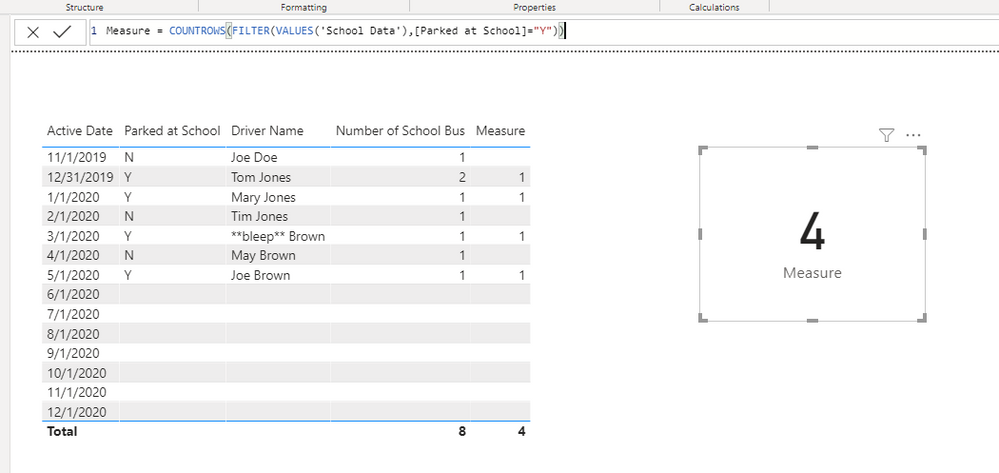
I have tested using the sample data and expression you provided, but the result is no problem.

school.PNG


To find the cause of your problem, please share me your .pbix file, removing sensitive information and replace real data with dummy data. It is suggested to upload your file to OneDrive for Business and then paste the link here.


Best Regards,

Icey

Anonymous
Not applicable

Thanks @Icey . I still don't know what is causing the formula to calculate the way it has been... the subtotals are correct but if i select the individual driver names, if it's 1 school bus in the excel, the PBI dax formula displays it as 12 school buses assigned to the driver. But the subtotal and grand totals are correct. I have accepted FrankAT solution. Your confirmation shows that the formula with the sample data is working. Thanks for helping!

Anonymous
Not applicable

@FrankAT, the measure you suggested does not work .. it too is giving a skewered calculation, which is counting all the rows and not the rows for the column that has a 'Y' value.

Hi @Anonymous ,

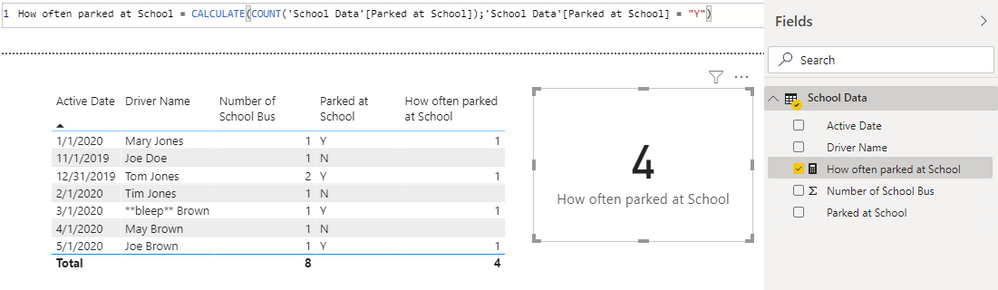
to illustrate my solution:


13-05-_2020_00-32-08.pngRegards FrankAT

FrankAT
Community Champion
Community Champion

Hi @Anonymous ,

use the following measure:


How often parked at School = CALCULATE(COUNT('Table'[Parked at School]);'Table'[Parked at School] = "Y")
 
Regards FrankAT

Helpful resources

Announcements
April Power BI Update Carousel

Power BI Monthly Update - April 2026

Check out the April 2026 Power BI update to learn about new features.

New to Fabric survey Carousel

New to Fabric Survey

If you have recently started exploring Fabric, we'd love to hear how it's going. Your feedback can help with product improvements.

Power BI DataViz World Championships carousel

Power BI DataViz World Championships - June 2026

A new Power BI DataViz World Championship is coming this June! Don't miss out on submitting your entry.

FabCon and SQLCon Highlights Carousel

FabCon &SQLCon Highlights

Experience the highlights from FabCon & SQLCon, available live and on-demand starting April 14th.