We've captured the moments from FabCon & SQLCon that everyone is talking about, and we are bringing them to the community, live and on-demand. Starts on April 14th. Register now
Hello! I am new on here - first post!!
I have a measure calculated as: Missed Meal Hrs = count('Final Data'[Employee ID])*.5
I am trying to create another measure that would take a min value of the above measure and another value:
Missed Meal OT = min(sum('my data'[Overtime Hours]),[Missed Meal Hrs])
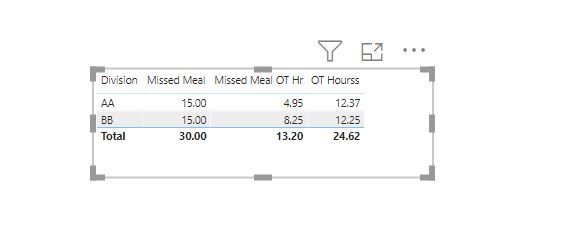
the structure of my data is such that for each [Employee ID] I have multiple rows. then all Employee IDs can be grouped into areas. When I look at my data as a table where each row is an Employee ID - the 2 formulas above calculate correctly. But when I take Employee IDs out of the table, and each row is now an Area - the Missed Meal OT formula does not aggregate at the Employee ID level, and tries to just use the totals of each area, which is not what I want. Any help would be greatly appreciated!
For some reason, I'm having a hard time with copying a table into the body of the comment and don't see how to attach a file. Hopefully this link works:
https://www.dropbox.com/s/atwxz9wezhz1tna/Book1.xlsx?dl=0
Division | Employee ID | Missed Meal Hrs | OT Hours | Missed Meal OT hours |
| AA | 12345 | 2.5 | 0 | 0 |
| AA | 12346 | 2.5 | 0 | 0 |
| AA | 12347 | 2.5 | 0.22 | 0.22 |
| AA | 12348 | 2.5 | 9.92 | 2.5 |
| AA | 12349 | 2.5 | 2.18 | 2.18 |
| AA | 12350 | 2.5 | 0.05 | 0.05 |
| BB | 12351 | 2.5 | 2.93 | 2.5 |
| BB | 12352 | 2.5 | 0 | 0 |
| BB | 12353 | 2.5 | 0.6 | 0.6 |
| BB | 12354 | 2.5 | 3.75 | 2.5 |
| BB | 12355 | 2.5 | 4.82 | 2.5 |
| BB | 12356 | 2.5 | 0.15 | 0.15 |
| Desired output | Missed Meal Hrs | OT Hours | Missed Meal OT hours |
| AA total | 15.00 | 12.37 | 4.95 |
| BB Total | 15.00 | 12.25 | 8.25 |
| What I am getting: | Missed Meal Hrs | OT Hours | Missed Meal OT hours |
| AA total | 15.00 | 12.37 | 12.37 |
| BB Total | 15.00 | 12.25 | 12.25 |
Hi @kdunaev ,
You can use the below measures.
@kdunaev , I think somehow I am not getting what you were getting
https://docs.microsoft.com/en-us/power-bi/create-reports/desktop-accessibility-keyboard-shortcuts
If you have recently started exploring Fabric, we'd love to hear how it's going. Your feedback can help with product improvements.
A new Power BI DataViz World Championship is coming this June! Don't miss out on submitting your entry.
Share feedback directly with Fabric product managers, participate in targeted research studies and influence the Fabric roadmap.
| User | Count |
|---|---|
| 57 | |
| 38 | |
| 33 | |
| 19 | |
| 16 |
| User | Count |
|---|---|
| 68 | |
| 66 | |
| 41 | |
| 34 | |
| 24 |