FabCon is coming to Atlanta
Join us at FabCon Atlanta from March 16 - 20, 2026, for the ultimate Fabric, Power BI, AI and SQL community-led event. Save $200 with code FABCOMM.
Register now!- Power BI forums
- Get Help with Power BI
- Desktop
- Service
- Report Server
- Power Query
- Mobile Apps
- Developer
- DAX Commands and Tips
- Custom Visuals Development Discussion
- Health and Life Sciences
- Power BI Spanish forums
- Translated Spanish Desktop
- Training and Consulting
- Instructor Led Training
- Dashboard in a Day for Women, by Women
- Galleries
- Data Stories Gallery
- Themes Gallery
- Contests Gallery
- QuickViz Gallery
- Quick Measures Gallery
- Visual Calculations Gallery
- Notebook Gallery
- Translytical Task Flow Gallery
- TMDL Gallery
- R Script Showcase
- Webinars and Video Gallery
- Ideas
- Custom Visuals Ideas (read-only)
- Issues
- Issues
- Events
- Upcoming Events
The Power BI Data Visualization World Championships is back! Get ahead of the game and start preparing now! Learn more
- Power BI forums
- Forums
- Get Help with Power BI
- Desktop
- Re: next version start date as the end of the curr...
- Subscribe to RSS Feed
- Mark Topic as New
- Mark Topic as Read
- Float this Topic for Current User
- Bookmark
- Subscribe
- Printer Friendly Page


- Mark as New
- Bookmark
- Subscribe
- Mute
- Subscribe to RSS Feed
- Permalink
- Report Inappropriate Content
next version start date as the end of the current version DAX Column
Hi Everyone,
I need to create a DAX column based on the next version start date. see the below data I need to create End Date column. if the next version is not available need to take today's date as the end date.
Thank you very much for your time.
| BOM_Name | Item No | Quantity | Version_ID | StartDate | End Date |
| Apple Pie | ABC001 | 11 | 1 | 01/01/20 | 03/01/20 |
| Apple Pie | ABC002 | 21 | 1 | 01/01/20 | 03/01/20 |
| Apple Pie | ABC003 | 8 | 1 | 01/01/20 | 03/01/20 |
| Apple Pie | ABC004 | 27 | 1 | 01/01/20 | 03/01/20 |
| Apple Pie | ABC005 | 6 | 1 | 01/01/20 | 03/01/20 |
| Apple Pie | ABC006 | 5 | 1 | 01/01/20 | 03/01/20 |
| Apple Pie | ABC001 | 27 | 2 | 03/01/20 | 07/01/20 |
| Apple Pie | ABC002 | 22 | 2 | 03/01/20 | 07/01/20 |
| Apple Pie | ABC003 | 8 | 2 | 03/01/20 | 07/01/20 |
| Apple Pie | ABC004 | 8 | 2 | 03/01/20 | 07/01/20 |
| Apple Pie | ABC005 | 6 | 2 | 03/01/20 | 07/01/20 |
| Apple Pie | ABC006 | 5 | 2 | 03/01/20 | 07/01/20 |
| Apple Pie | ABC001 | 21 | 3 | 07/01/20 | Today() |
| Apple Pie | ABC002 | 27 | 3 | 07/01/20 | Today() |
| Apple Pie | ABC003 | 11 | 3 | 07/01/20 | Today() |
| Apple Pie | ABC004 | 8 | 3 | 07/01/20 | Today() |
| Apple Pie | ABC005 | 6 | 3 | 07/01/20 | Today() |
Solved! Go to Solution.


- Mark as New
- Bookmark
- Subscribe
- Mute
- Subscribe to RSS Feed
- Permalink
- Report Inappropriate Content
Hi, @dilumd
It’s my pleasure to answer for you.
According to your description, I think you can create a measure to calculate the correct end date.
Like this:
Measure:
end date =
VAR a =
    MAXX (
        FILTER (
            ALL ( Table2 ),
            [item] = SELECTEDVALUE ( Table2[item] )
                && [name] = SELECTEDVALUE ( Table2[name] )
                && [version-id]
                    = SELECTEDVALUE ( Table2[version-id] ) + 1
        ),
        Table2[startdate]
    )
RETURN
    IF ( a = BLANK (), TODAY (), a )
Or if you want use calculated column,please change ‘selectedvalue’ to ‘earlier’.
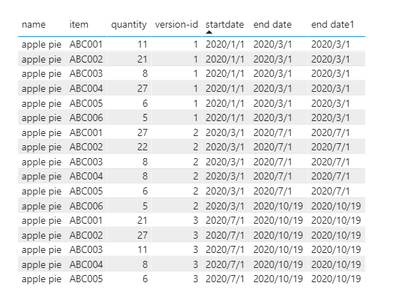
If it doesn’t solve your problem, please feel free to ask me.
Best Regards
Janey Guo
If this post helps, then please consider Accept it as the solution to help the other members find it more quickly.


- Mark as New
- Bookmark
- Subscribe
- Mute
- Subscribe to RSS Feed
- Permalink
- Report Inappropriate Content
Hi,
This calculated column works
=if(ISBLANK(CALCULATE(MIN(Data[Start Date]),FILTER(Data,Data[BOM_Name]=EARLIER(Data[BOM_Name])&&Data[Item No]=EARLIER(Data[Item No])&&Data[Start Date]>EARLIER(Data[Start Date])))),today(),CALCULATE(MIN(Data[Start Date]),FILTER(Data,Data[BOM_Name]=EARLIER(Data[BOM_Name])&&Data[Item No]=EARLIER(Data[Item No])&&Data[Start Date]>EARLIER(Data[Start Date]))))Hope this helps.
Regards,
Ashish Mathur
http://www.ashishmathur.com
https://www.linkedin.com/in/excelenthusiasts/
- Mark as New
- Bookmark
- Subscribe
- Mute
- Subscribe to RSS Feed
- Permalink
- Report Inappropriate Content
Hi, @dilumd
It’s my pleasure to answer for you.
According to your description, I think you can create a measure to calculate the correct end date.
Like this:
Measure:
end date =
VAR a =
    MAXX (
        FILTER (
            ALL ( Table2 ),
            [item] = SELECTEDVALUE ( Table2[item] )
                && [name] = SELECTEDVALUE ( Table2[name] )
                && [version-id]
                    = SELECTEDVALUE ( Table2[version-id] ) + 1
        ),
        Table2[startdate]
    )
RETURN
    IF ( a = BLANK (), TODAY (), a )
Or if you want use calculated column,please change ‘selectedvalue’ to ‘earlier’.
If it doesn’t solve your problem, please feel free to ask me.
Best Regards
Janey Guo
If this post helps, then please consider Accept it as the solution to help the other members find it more quickly.

- Mark as New
- Bookmark
- Subscribe
- Mute
- Subscribe to RSS Feed
- Permalink
- Report Inappropriate Content
@dilumd ,
Try like
coalesce(Minx(filter(table, [Version_ID] > earlier([Version_ID])+1 ),[StartDate]), today())
coalesce(Minx(filter(table, [Version_ID] > earlier([Version_ID])+1 ),earlier([StartDate])), today())
- Mark as New
- Bookmark
- Subscribe
- Mute
- Subscribe to RSS Feed
- Permalink
- Report Inappropriate Content
Thank you @amitchandak
However, with that formula, I'm getting the below answer which is not what I need. maybe I'll add more data for the clarity.
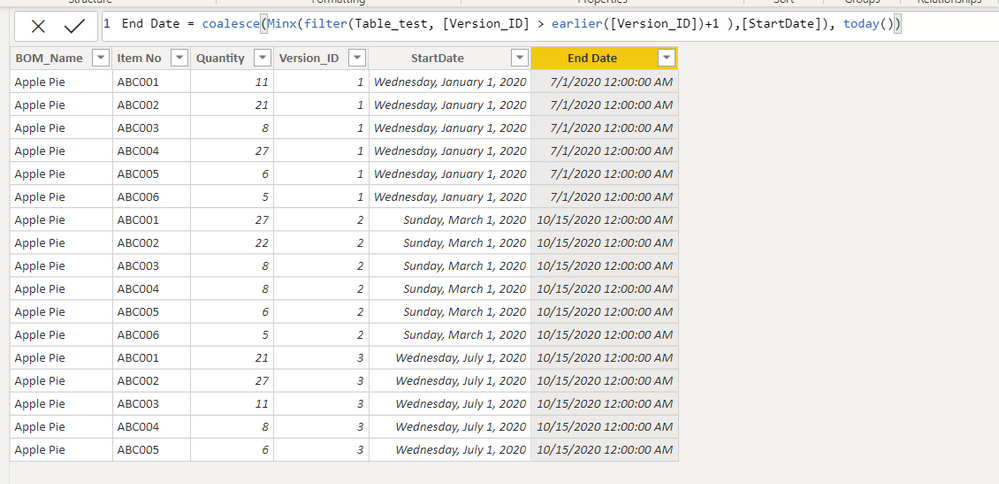
Added more data,
BOM_NameItem NoQuantityVersion_IDStartDateEnd Date
| Apple Pie | ABC001 | 11 | 1 | 1/1/2020 | 3/1/2020 |
| Apple Pie | ABC002 | 21 | 1 | 1/1/2020 | 3/1/2020 |
| Apple Pie | ABC003 | 8 | 1 | 1/1/2020 | 3/1/2020 |
| Apple Pie | ABC004 | 27 | 1 | 1/1/2020 | 3/1/2020 |
| Apple Pie | ABC005 | 6 | 1 | 1/1/2020 | 3/1/2020 |
| Apple Pie | ABC006 | 5 | 1 | 1/1/2020 | 3/1/2020 |
| Apple Pie | ABC001 | 27 | 2 | 3/1/2020 | 7/1/2020 |
| Apple Pie | ABC002 | 22 | 2 | 3/1/2020 | 7/1/2020 |
| Apple Pie | ABC003 | 8 | 2 | 3/1/2020 | 7/1/2020 |
| Apple Pie | ABC004 | 8 | 2 | 3/1/2020 | 7/1/2020 |
| Apple Pie | ABC005 | 6 | 2 | 3/1/2020 | 7/1/2020 |
| Apple Pie | ABC006 | 5 | 2 | 3/1/2020 | 7/1/2020 |
| Apple Pie | ABC001 | 21 | 3 | 7/1/2020 | Today() |
| Apple Pie | ABC002 | 27 | 3 | 7/1/2020 | Today() |
| Apple Pie | ABC003 | 11 | 3 | 7/1/2020 | Today() |
| Apple Pie | ABC004 | 8 | 3 | 7/1/2020 | Today() |
| Apple Pie | ABC005 | 6 | 3 | 7/1/2020 | Today() |
| Cake | ABC001 | 11 | 1 | 1/1/2020 | 6/1/2020 |
| Cake | ABC002 | 21 | 1 | 1/1/2020 | 6/1/2020 |
| Cake | ABC003 | 8 | 1 | 1/1/2020 | 6/1/2020 |
| Cake | ABC004 | 27 | 1 | 1/1/2020 | 6/1/2020 |
| Cake | ABC005 | 6 | 1 | 1/1/2020 | 6/1/2020 |
| Cake | ABC006 | 5 | 1 | 1/1/2020 | 6/1/2020 |
| Cake | ABC001 | 27 | 2 | 6/1/2020 | Today() |
| Cake | ABC002 | 22 | 2 | 6/1/2020 | Today() |
| Cake | ABC003 | 8 | 2 | 6/1/2020 | Today() |
| Cake | ABC004 | 8 | 2 | 6/1/2020 | Today() |
| Cake | ABC005 | 6 | 2 | 6/1/2020 | Today() |
| Cake | ABC006 | 5 | 2 | 6/1/2020 | Today() |
- Mark as New
- Bookmark
- Subscribe
- Mute
- Subscribe to RSS Feed
- Permalink
- Report Inappropriate Content
Hi,
This calculated column works
=if(ISBLANK(CALCULATE(MIN(Data[Start Date]),FILTER(Data,Data[BOM_Name]=EARLIER(Data[BOM_Name])&&Data[Item No]=EARLIER(Data[Item No])&&Data[Start Date]>EARLIER(Data[Start Date])))),today(),CALCULATE(MIN(Data[Start Date]),FILTER(Data,Data[BOM_Name]=EARLIER(Data[BOM_Name])&&Data[Item No]=EARLIER(Data[Item No])&&Data[Start Date]>EARLIER(Data[Start Date]))))Hope this helps.
Regards,
Ashish Mathur
http://www.ashishmathur.com
https://www.linkedin.com/in/excelenthusiasts/

Helpful resources

Power BI Monthly Update - November 2025
Check out the November 2025 Power BI update to learn about new features.

Fabric Data Days
Advance your Data & AI career with 50 days of live learning, contests, hands-on challenges, study groups & certifications and more!

FabCon Atlanta 2026
Join us at FabCon Atlanta, March 16-20, for the ultimate Fabric, Power BI, AI and SQL community-led event. Save $200 with code FABCOMM.

| User | Count |
|---|---|
| 57 | |
| 45 | |
| 42 | |
| 20 | |
| 18 |


