cancel
Showing results for 
Search instead for 
Did you mean: 

Learn from the best! Meet the four finalists headed to the FINALS of the Power BI Dataviz World Championships! Register now

Reply
sclencioco
Helper I
Helper I

multiplying columns

Hello,


Need help here.


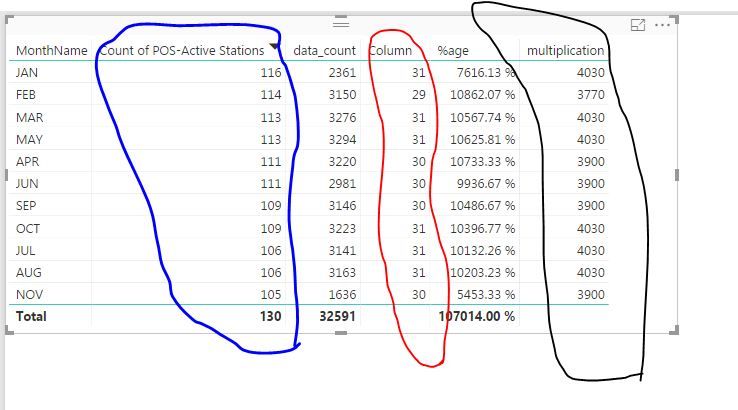
I am trying to multiply two columns (encircled with BLUE and RED) . Unfortunately, the result shows that it used the total value on the cloumn encircled with BLUE.


Capture111716.JPG


Expected output: 116(actual data) x 31 = 3596


Output on Desktop: 130 (total) x 31 = 4030


 What I want to be multiplied is the data per row and not the total. Here's the formula of the column encircled with BLACK


multiplication = [Column] * (DISTINCTCOUNT('2015_POSdata'[POS-Active Stations]))


Thank you.

1 ACCEPTED SOLUTION
v-caliao-msft
Microsoft Employee
Microsoft Employee

Hi @sclencioco,


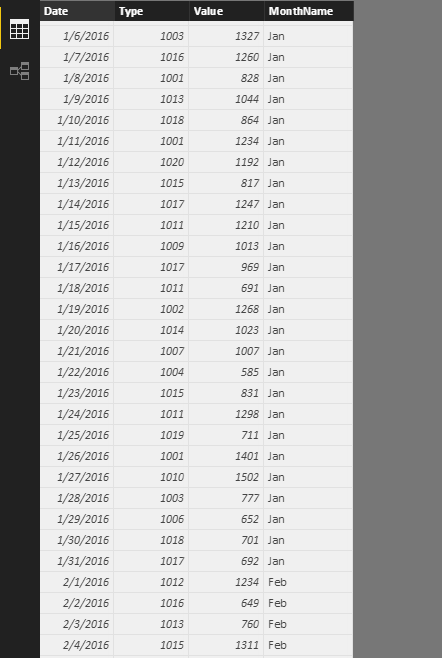
I have tested it on my local environment by using the sample data below.
CountMonthday = CALCULATE(COUNTA(Sheet6[Date]),ALLEXCEPT(Sheet6,Sheet6[MonthName]))
DistinctCountMonthday = CALCULATE(DISTINCTCOUNT(Sheet6[Type]),ALLEXCEPT(Sheet6,Sheet6[MonthName]))
Measure = Sheet6[CountMonthday]*Sheet6[DistinctCountMonthday]

Capture.PNGCapture1.PNG


Regards,

Charlie Liao

View solution in original post

2 REPLIES 2
v-caliao-msft
Microsoft Employee
Microsoft Employee

Hi @sclencioco,


I have tested it on my local environment by using the sample data below.
CountMonthday = CALCULATE(COUNTA(Sheet6[Date]),ALLEXCEPT(Sheet6,Sheet6[MonthName]))
DistinctCountMonthday = CALCULATE(DISTINCTCOUNT(Sheet6[Type]),ALLEXCEPT(Sheet6,Sheet6[MonthName]))
Measure = Sheet6[CountMonthday]*Sheet6[DistinctCountMonthday]

Capture.PNGCapture1.PNG


Regards,

Charlie Liao

Hi Charlie_Liao


Got it by using your suggested solution and adjusted one of them


CountMonthday = CALCULATE(COUNTA(Sheet6[Date]),ALLEXCEPT(Sheet6,Sheet6[MonthName]))


I used this:


CountMonthday = CALCULATE(DISTINCTCOUNT(Sheet6[Date]),ALLEXCEPT(Sheet6,Sheet6[MonthName]))


I was able to replicate your result.


Thank you!

Helpful resources

Announcements
Join our Fabric User Panel

Join our Fabric User Panel

Share feedback directly with Fabric product managers, participate in targeted research studies and influence the Fabric roadmap.

February Power BI Update Carousel

Power BI Monthly Update - February 2026

Check out the February 2026 Power BI update to learn about new features.

FabCon Atlanta 2026 carousel

FabCon Atlanta 2026

Join us at FabCon Atlanta, March 16-20, for the ultimate Fabric, Power BI, AI and SQL community-led event. Save $200 with code FABCOMM.