Join us at FabCon Atlanta from March 16 - 20, 2026, for the ultimate Fabric, Power BI, AI and SQL community-led event. Save $200 with code FABCOMM.
Register now!The Power BI Data Visualization World Championships is back! It's time to submit your entry. Live now!
Hello,
Need help here.
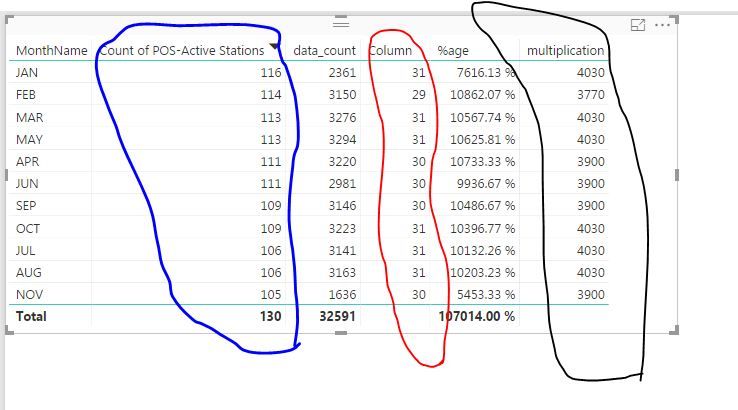
I am trying to multiply two columns (encircled with BLUE and RED) . Unfortunately, the result shows that it used the total value on the cloumn encircled with BLUE.
Expected output: 116(actual data) x 31 = 3596
Output on Desktop: 130 (total) x 31 = 4030
What I want to be multiplied is the data per row and not the total. Here's the formula of the column encircled with BLACK
multiplication = [Column] * (DISTINCTCOUNT('2015_POSdata'[POS-Active Stations]))
Thank you.
Solved! Go to Solution.
Hi @sclencioco,
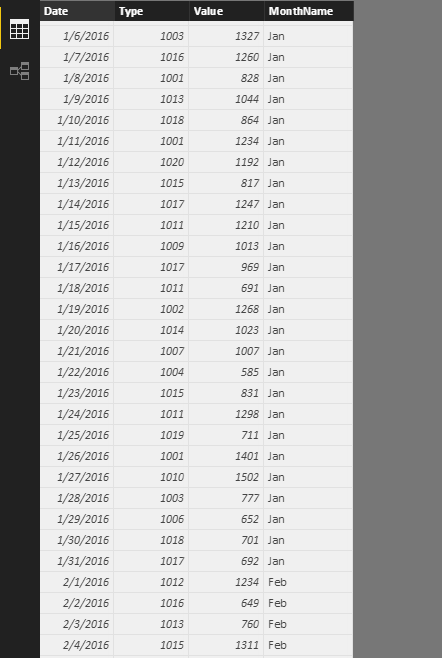
I have tested it on my local environment by using the sample data below.
CountMonthday = CALCULATE(COUNTA(Sheet6[Date]),ALLEXCEPT(Sheet6,Sheet6[MonthName]))
DistinctCountMonthday = CALCULATE(DISTINCTCOUNT(Sheet6[Type]),ALLEXCEPT(Sheet6,Sheet6[MonthName]))
Measure = Sheet6[CountMonthday]*Sheet6[DistinctCountMonthday]
Regards,
Charlie Liao
Hi @sclencioco,
I have tested it on my local environment by using the sample data below.
CountMonthday = CALCULATE(COUNTA(Sheet6[Date]),ALLEXCEPT(Sheet6,Sheet6[MonthName]))
DistinctCountMonthday = CALCULATE(DISTINCTCOUNT(Sheet6[Type]),ALLEXCEPT(Sheet6,Sheet6[MonthName]))
Measure = Sheet6[CountMonthday]*Sheet6[DistinctCountMonthday]
Regards,
Charlie Liao
Hi Charlie_Liao
Got it by using your suggested solution and adjusted one of them
CountMonthday = CALCULATE(COUNTA(Sheet6[Date]),ALLEXCEPT(Sheet6,Sheet6[MonthName]))
I used this:
CountMonthday = CALCULATE(DISTINCTCOUNT(Sheet6[Date]),ALLEXCEPT(Sheet6,Sheet6[MonthName]))
I was able to replicate your result.
Thank you!
The Power BI Data Visualization World Championships is back! It's time to submit your entry.
| User | Count |
|---|---|
| 50 | |
| 43 | |
| 36 | |
| 33 | |
| 30 |
| User | Count |
|---|---|
| 138 | |
| 120 | |
| 60 | |
| 59 | |
| 56 |