Join us at FabCon Atlanta from March 16 - 20, 2026, for the ultimate Fabric, Power BI, AI and SQL community-led event. Save $200 with code FABCOMM.
Register now!Learn from the best! Meet the four finalists headed to the FINALS of the Power BI Dataviz World Championships! Register now
dears,
good day!!
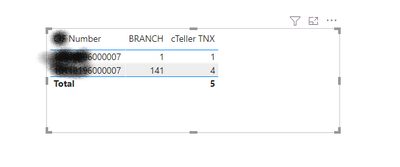
the table below has the same number in rows, how to show only the max value ? note that i'm just filtring on one number as i have many numbers in the table
which is branch 141 and cteller tnx 4
Solved! Go to Solution.
Selector =
VAR FinalCIF = MAX('Transactions'[FinalCIF])
VAR MaxBranch = MAXX(FILTER(ALL('transactions'),[FinalCIF] = FinalCIF),[Branch])
VAR Branch = MAX('transactions'[Branch])
RETURN
IF(MaxBranch =Branch,1,0)
The 2 issues were, you need single quotes around your table names ( you were missing a closing single quote in your FinalCIF VAR line. Also, variables (VAR) names cannot have spaces in them.
thank you for the support
@160475 Maybe try a Complex Selector:
Selector =
VAR __Number = MAX('Table'[Number])
VAR __MaxBranch = MAXX(FILTER(ALL('Table'),[Number] = __Number),[Branch])
VAR __Branch = MAX('Table'[Branch])
RETURN
IF(__MaxBranch = __Branch,1,0)
ihave done this but it doesnt work can you correct it for me ?
Selector =
VAR FinalCIF = MAX('Transactions'[FinalCIF])
VAR MaxBranch = MAXX(FILTER(ALL('transactions'),[FinalCIF] = FinalCIF),[Branch])
VAR Branch = MAX('transactions'[Branch])
RETURN
IF(MaxBranch =Branch,1,0)
The 2 issues were, you need single quotes around your table names ( you were missing a closing single quote in your FinalCIF VAR line. Also, variables (VAR) names cannot have spaces in them.
Share feedback directly with Fabric product managers, participate in targeted research studies and influence the Fabric roadmap.
Check out the February 2026 Power BI update to learn about new features.
| User | Count |
|---|---|
| 61 | |
| 54 | |
| 40 | |
| 17 | |
| 14 |
| User | Count |
|---|---|
| 98 | |
| 84 | |
| 35 | |
| 30 | |
| 25 |