This time we’re going bigger than ever. Fabric, Power BI, SQL, AI and more. We're covering it all. You won't want to miss it.
Learn moreLevel up your Power BI skills this month - build one visual each week and tell better stories with data! Get started
dears,
good day!!
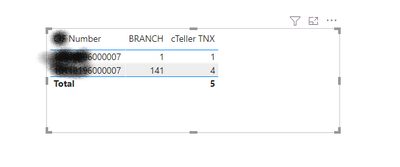
the table below has the same number in rows, how to show only the max value ? note that i'm just filtring on one number as i have many numbers in the table
which is branch 141 and cteller tnx 4
Solved! Go to Solution.
Selector =
VAR FinalCIF = MAX('Transactions'[FinalCIF])
VAR MaxBranch = MAXX(FILTER(ALL('transactions'),[FinalCIF] = FinalCIF),[Branch])
VAR Branch = MAX('transactions'[Branch])
RETURN
IF(MaxBranch =Branch,1,0)
The 2 issues were, you need single quotes around your table names ( you were missing a closing single quote in your FinalCIF VAR line. Also, variables (VAR) names cannot have spaces in them.
thank you for the support
@160475 Maybe try a Complex Selector:
Selector =
VAR __Number = MAX('Table'[Number])
VAR __MaxBranch = MAXX(FILTER(ALL('Table'),[Number] = __Number),[Branch])
VAR __Branch = MAX('Table'[Branch])
RETURN
IF(__MaxBranch = __Branch,1,0)
ihave done this but it doesnt work can you correct it for me ?
Selector =
VAR FinalCIF = MAX('Transactions'[FinalCIF])
VAR MaxBranch = MAXX(FILTER(ALL('transactions'),[FinalCIF] = FinalCIF),[Branch])
VAR Branch = MAX('transactions'[Branch])
RETURN
IF(MaxBranch =Branch,1,0)
The 2 issues were, you need single quotes around your table names ( you were missing a closing single quote in your FinalCIF VAR line. Also, variables (VAR) names cannot have spaces in them.
Check out the April 2026 Power BI update to learn about new features.
Sign up to receive a private message when registration opens and key events begin.
If you have recently started exploring Fabric, we'd love to hear how it's going. Your feedback can help with product improvements.
| User | Count |
|---|---|
| 35 | |
| 32 | |
| 26 | |
| 21 | |
| 18 |
| User | Count |
|---|---|
| 68 | |
| 39 | |
| 33 | |
| 24 | |
| 23 |