Hi All,
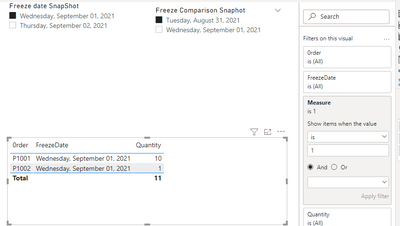
I am struglling with MAX function. I have 2 dimension tables and on Facttable. between 2 dimensions there is a inactive relationship . and between the fact table and FreezeDate Snapshot there is one active relationship
First Dimension
| Freeze date SnapShot | |
| 1-Sep-21 | |
| 2-Sep-21 | |
Second
| Freeze Comparison Snaphot | |
| |
| 1-Sep-21 | |
facttable
| FreezeDate | 0rder | Quantity | | |
| 1-Sep-21 | P1001 | 10 | | |
| 2-Sep-21 | P1001 | 20 | | |
| 1-Sep-21 | P1002 | 1 | | |
| 2-Sep-21 | P1002 | 10 | | |
| | | | | |
The goals is to comapre the order qty bewteen those two dates. Lets suppose user selects as Freeze Date snapshot 1s SEP 2021 and Comaprison date is 31 AUG 2021. The results that I need to achieve should be like below . I need to display in visual TABLE.
| Freeze date Comparison Snapshot | order Comparison Snapshot | Quanity Comparison Snapshot | Freeze Date Snapshot | Order Snaphot | QTY Snapshot | Qty Difference Between 2 freezes dates |
| 31-Aug-21 | empty | Empty | 1-Sep-21 | P1001 | 10 | -10 |
| 31-Aug-21 | Empty | Empty | 1-Sep-21 | P1002 | 20 | -20 |
However the results that I have is : As you can see it shows the max order which is P1002 .
| Freeze date Comparison Snapshot | order Comparison Snapshot | Quanity Comparison Snapshot | Freeze Date Snapshot | Order Snapshot | QTY Snaphot | Qty Difference Between 2 freezes dates |
| 31-Aug-21 | empty | Empty | 1-Sep-21 | P1002 | 10 | -10 |
But if I drop the "order column " from the fact table it shows correctly but I dont want to show the order column from Fact Table
| Freeze date Comparison Snapshot | order Comparison Snapshot | Quanity Snapshot | Freeze Date Snapshot | Order | QTY | Qty Difference Between 2 freezes dates | "Order" |
| 31-Aug-21 | empty | Empty | 1-Sep-21 | P1001 | 10 | -10 | P1001 |
| 31-Aug-21 | Empty | Empty | 1-Sep-21 | P1002 | 20 | -20 | P1002 |
these are my measures
Order Comaprison Snaphot=Calculate (
Max(Order).Facttable, Remove filters (FreezeDate Snapshot),
UserRelationship(freezedateSnapshot), (freezedateComparison Snapshot)
Qty Comparison =Calculate (
SUM(Qty).Facttable, Remove filters (FreezeDate Snapshot),
UserRelationship(freezedateSnapshot), (freezedateComparison Snapshot)
Order Snaphot=Max(Order).Facttable
QTY Snapshot=sum(Qty).facttable