Join us at FabCon Atlanta from March 16 - 20, 2026, for the ultimate Fabric, Power BI, AI and SQL community-led event. Save $200 with code FABCOMM.
Register now!Vote for your favorite vizzies from the Power BI Dataviz World Championship submissions. Vote now!
Hello Gurus
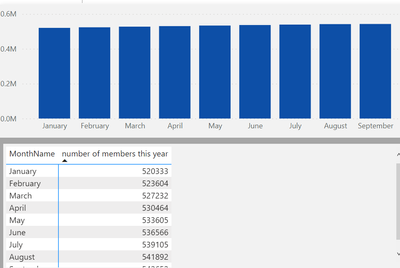
I have a graph where I show number of members per month. As you can see the change in the values is small and in the graph it shows like it has not change. Can I change the data range so that the graph shows the small increase?
Regards
PP
Solved! Go to Solution.
@PBIDEV_10 , from Aug 2021, release you can use measure in the start and end value of the axis. Create measure and use those
Start Value = minx(values(Table[Month]), [Measure]) -1
end Value = maxx(values(Table[Month]), [Measure]) +1
Use these in fx of start and end
Hi @PBIDEV_10,
AFAIK, current power bi seems not have a feature to auto-resize the axis ranges to fit your data bars.
For this scenario, I think you can refer to amitchandak 's point of view to changing the start/end range of the axis to help recognize the small difference between these values.
Customize X-axis and Y-axis properties - Power BI | Microsoft Docs
Regards,
Xiaoxin Sheng
@PBIDEV_10 , from Aug 2021, release you can use measure in the start and end value of the axis. Create measure and use those
Start Value = minx(values(Table[Month]), [Measure]) -1
end Value = maxx(values(Table[Month]), [Measure]) +1
Use these in fx of start and end
Vote for your favorite vizzies from the Power BI World Championship submissions!
If you love stickers, then you will definitely want to check out our Community Sticker Challenge!
Check out the January 2026 Power BI update to learn about new features.
| User | Count |
|---|---|
| 66 | |
| 51 | |
| 42 | |
| 25 | |
| 22 |
| User | Count |
|---|---|
| 139 | |
| 116 | |
| 54 | |
| 37 | |
| 31 |