Get certified for free when you join Fabric Data Days 2026 and dive into Fabric, Power BI, SQL, AI, and other essential data skills.
Join nowJuly 7 - July 17 | Round 2 of the Power BI Dataviz World Championships. Don't miss your chance! Learn more
Hello Gurus
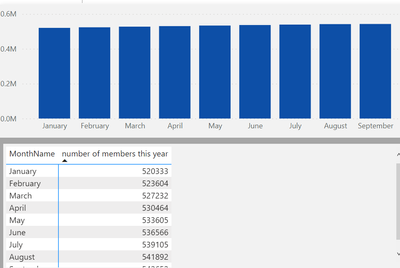
I have a graph where I show number of members per month. As you can see the change in the values is small and in the graph it shows like it has not change. Can I change the data range so that the graph shows the small increase?
Regards
PP
Solved! Go to Solution.
@PBIDEV_10 , from Aug 2021, release you can use measure in the start and end value of the axis. Create measure and use those
Start Value = minx(values(Table[Month]), [Measure]) -1
end Value = maxx(values(Table[Month]), [Measure]) +1
Use these in fx of start and end
Hi @PBIDEV_10,
AFAIK, current power bi seems not have a feature to auto-resize the axis ranges to fit your data bars.
For this scenario, I think you can refer to amitchandak 's point of view to changing the start/end range of the axis to help recognize the small difference between these values.
Customize X-axis and Y-axis properties - Power BI | Microsoft Docs
Regards,
Xiaoxin Sheng
@PBIDEV_10 , from Aug 2021, release you can use measure in the start and end value of the axis. Create measure and use those
Start Value = minx(values(Table[Month]), [Measure]) -1
end Value = maxx(values(Table[Month]), [Measure]) +1
Use these in fx of start and end
Join us in Barcelona for FabCon and SQLCon, the Fabric, Power BI, SQL, and AI community event. Save €200 with code FABCMTY200.
Join Fabric Data Days 2026: 60 days of free live/on-demand sessions, challenges, study groups, and certification opportunities.
| User | Count |
|---|---|
| 22 | |
| 22 | |
| 18 | |
| 16 | |
| 13 |
| User | Count |
|---|---|
| 63 | |
| 42 | |
| 40 | |
| 40 | |
| 40 |