Hi Guys
I am strugeling to find a solution for my line charts. I have a sales data (my fact table) which includes sales data and the order date granularity is week. There are a lots of accounts that only order 5 times a year as this is WHS.
Then I have a date fact table which granularity is also on week ( it is not really data table becasue i can not use time functions as I dont have day granularity). I linked these two tables by week nr/year and created both direction relationship.
When I want to display data in line chart and put Week nr (without year) on the axis and sale in the value i am facing this issue:
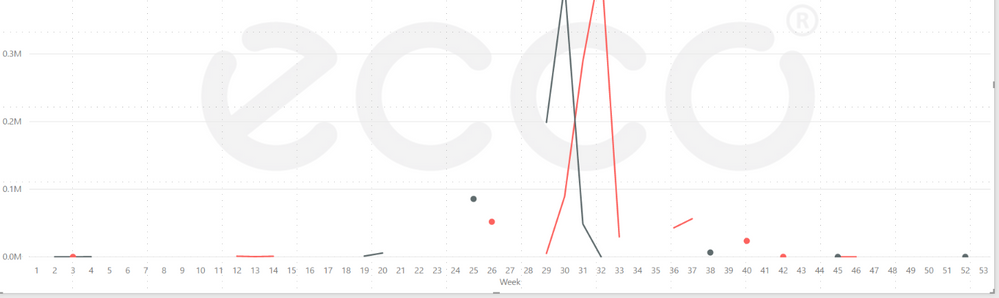 line chart xaxis categorical type
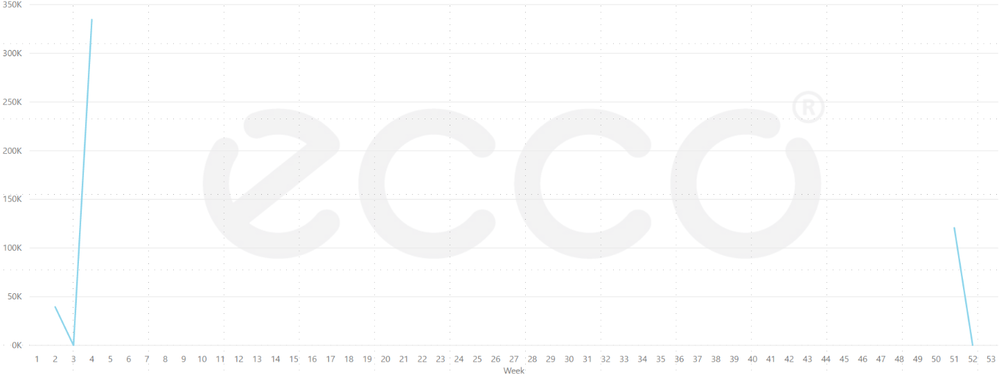 line chart xaxis categorical type
Due the fact that some customers/accounts only place 5-10 orders per year they will have only few records and in the line chart the line will consist of points and short lines rather than one continuous line.
When I change the X axis type from Categorical to Continuous I get a continuous line but then the weeks are only by 10th and the graph is confusing as you can see below. The points between week 4 and 53 are connected but the line shuld be at the zero as there was no sale.
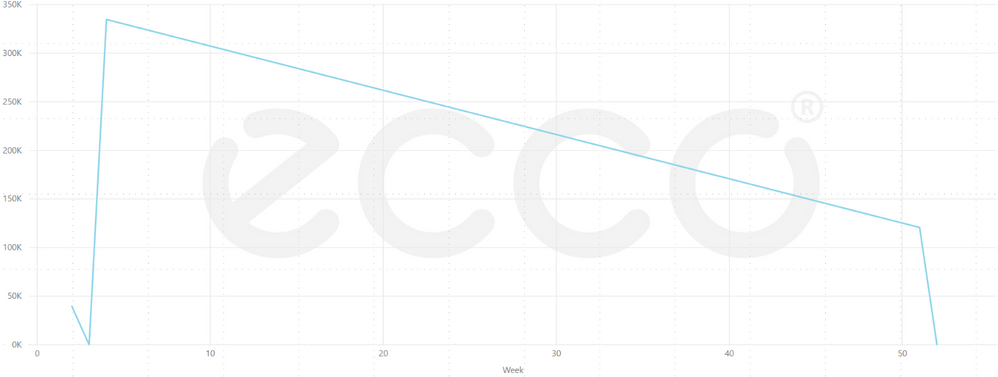 line chart xaxis continuous type
I just would like to make sure somehow that if there is no value for that week the becasue the customer didnt order it will be show zero in the graph.
In the past I tried to create a calculated column that will "guarantee" always a value if there was no sale.
I also understand that i should potentially look at higher granularity lets say month or quarter but I really hope that there is a way how to solve it.
Thank you


