Get certified for free when you join Fabric Data Days 2026 and dive into Fabric, Power BI, SQL, AI, and other essential data skills.
Join nowData Days is here! Join us now for 60+ days of learning, challenges, and connection. Learn more
Hi,
Is anybody there to help me. unable to resolve data model. i have attached the report
https://1drv.ms/u/s!ApPgrUdbr1NBb2-U9jy6VXx7j4I?e=w4KFN1
PAGE 2 I want to show my hour and day wise,
if you filter the DAY slicer on 28th my sales value should split by hour. currently i am getting same value for all hours in column metric.
same for the daywise , if i filter on DAY slicer on 28th i should get only value for column metric.
Guys please help
Solved! Go to Solution.
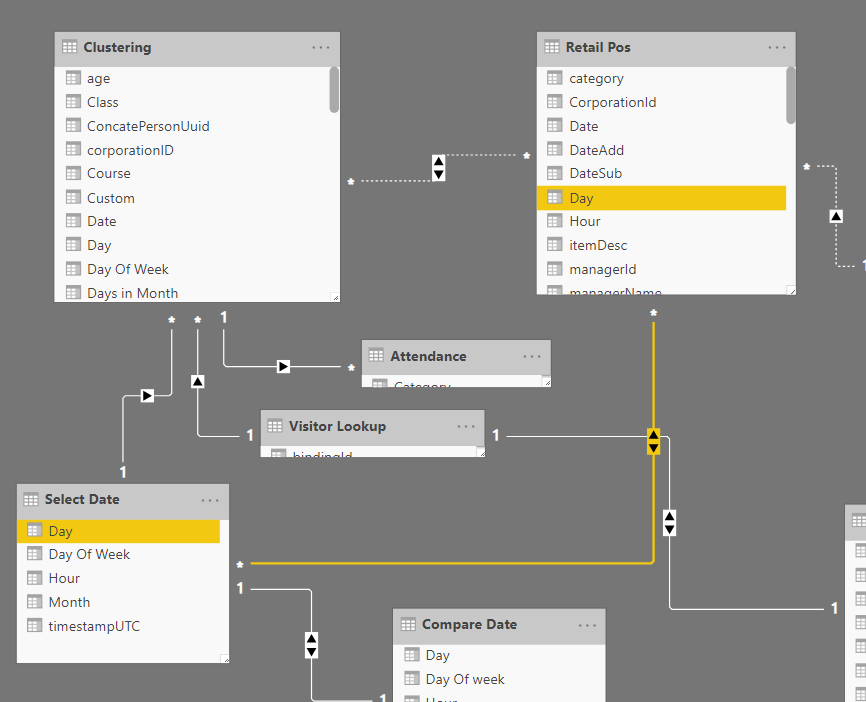
This is the relationship you would like to use
But unfortunately your relationship is at DAY level. So your grouping by hour in your visuals won't change filtered rows on the Retail table, because all hours will refer to the same day, so your total hours is the total hours of the day. You should change the granularity of the relationship OR you can change your formula:
Select Sales =
/*IF(
SUM('Retail Pos'[netAmount])=BLANK();0;
SUM('Retail Pos'[netAmount])
)*/
var val=SELECTEDVALUE('Select Date'[Hour])
var total=calculate(sumx('Retail Pos';'Retail Pos'[netAmount]);'Retail Pos'[Hour]=val)
RETURN
if(isblank(total);0;total)
repeat the formula for all the other metrics. This is the result:
Need separate date, hour and timestamp tables.
This is the relationship you would like to use
But unfortunately your relationship is at DAY level. So your grouping by hour in your visuals won't change filtered rows on the Retail table, because all hours will refer to the same day, so your total hours is the total hours of the day. You should change the granularity of the relationship OR you can change your formula:
Select Sales =
/*IF(
SUM('Retail Pos'[netAmount])=BLANK();0;
SUM('Retail Pos'[netAmount])
)*/
var val=SELECTEDVALUE('Select Date'[Hour])
var total=calculate(sumx('Retail Pos';'Retail Pos'[netAmount]);'Retail Pos'[Hour]=val)
RETURN
if(isblank(total);0;total)
repeat the formula for all the other metrics. This is the result:
Sir, first of all thankyou for solving this out.
, how can i change the granularity of the relationship
i used you formula in bar chart its working for hour. but all other values were affected. and no data in day wise
Don't miss out on Data Days, June 15 through August 7. Learn Fabric, Power BI, SQL, AI and more.
Check out the May 2026 Power BI update to learn about new features.
| User | Count |
|---|---|
| 23 | |
| 23 | |
| 21 | |
| 17 | |
| 13 |
| User | Count |
|---|---|
| 58 | |
| 51 | |
| 39 | |
| 29 | |
| 24 |