cancel
Showing results for 
Search instead for 
Did you mean: 

July 7 - July 17 | Round 2 of the Power BI Dataviz World Championships. Don't miss your chance! Learn more

Reply
Anonymous
Not applicable

if statement syntax error

Hello,


I am a bit new to this platfrom, and I am trying to write the below formula, but I am getting a Token RightParen expected error, and I am not sure why is the issue. It is highligting the "FH". Please help me to figure out the issue.


=if(Left([Season],1)="F" then "FH" else "SS")&Rright([Season],2)


Thanks,

WV

1 ACCEPTED SOLUTION
v-cherch-msft
Microsoft Employee
Microsoft Employee

Hi @Anonymous 

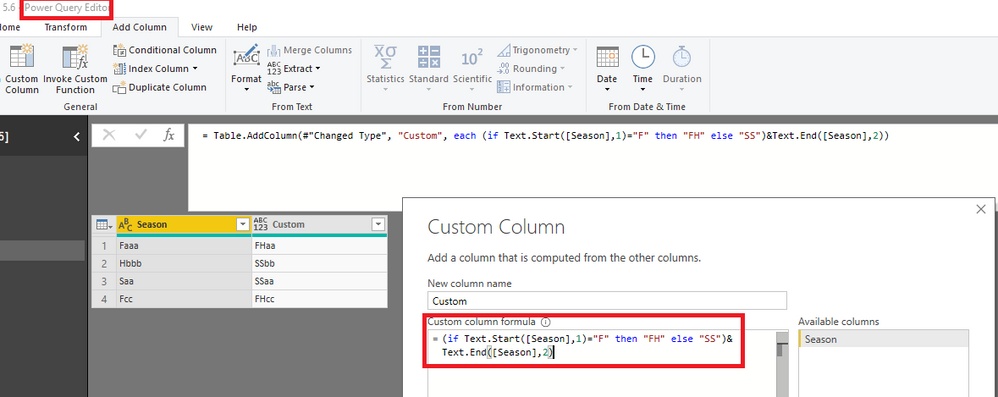
In query editor,you may create a custom column with M language:Text.Start and Text.End like below.

=(if Text.Start([Season],1)="F" then "FH" else "SS")&Text.End([Season],2)

1.png

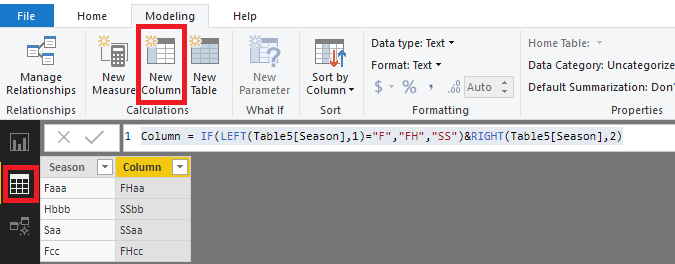
Second way in DAX with IF function.New a column in data view.

Column = IF(LEFT(Table5[Season],1)="F","FH","SS")&RIGHT(Table5[Season],2)

1.png

Regards,

Community Support Team _ Cherie Chen
If this post helps, then please consider Accept it as the solution to help the other members find it more quickly.

View solution in original post

4 REPLIES 4
v-cherch-msft
Microsoft Employee
Microsoft Employee

Hi @Anonymous 

In query editor,you may create a custom column with M language:Text.Start and Text.End like below.

=(if Text.Start([Season],1)="F" then "FH" else "SS")&Text.End([Season],2)

1.png

Second way in DAX with IF function.New a column in data view.

Column = IF(LEFT(Table5[Season],1)="F","FH","SS")&RIGHT(Table5[Season],2)

1.png

Regards,

Community Support Team _ Cherie Chen
If this post helps, then please consider Accept it as the solution to help the other members find it more quickly.
Anonymous
Not applicable

This is perfect! Thank you so much for your help!


Wendy

jtownsend21
Responsive Resident
Responsive Resident

If you are having trouble with the DAX syntax try the following (looks like you wrote this for Tableau. DAX has a learning curve coming from Tableau). 


= IF(
        LEFT([Season],1) = "F",
        "FH",
        "SS"
)

I am not sure what you are trying to accomplish with the last portion "&Rright([Season],2)"


If my solution didn't work, then it would be helpful if you posted some sample data or at least an example of the sample input and desired outcome. 

luisrh
Responsive Resident
Responsive Resident

Where exactly are you doing this.  If you are doing a DAX formula,  this will not work.

Please look at this similar question and solution... 


https://community.powerbi.com/t5/Desktop/if-then-else/td-p/117999


good luck!

Luis


If this was helpful, consider marking it as solved so others can find it easily.


Helpful resources

Announcements
FabCon and SQLCon Barcelona 2026

FabCon & SQLCon – Barcelona 2026

Join us in Barcelona for FabCon and SQLCon, the Fabric, Power BI, SQL, and AI community event. Save €200 with code FABCMTY200.

60 days of Data Days Carousel

Data Days 2026

Join Fabric Data Days 2026: 60 days of free live/on-demand sessions, challenges, study groups, and certification opportunities.

Power BI DataViz World Championships carousel

Power BI DataViz World Championships - June 2026

A new Power BI DataViz World Championship is coming this June! Don't miss out on submitting your entry.