Join us at FabCon Atlanta from March 16 - 20, 2026, for the ultimate Fabric, Power BI, AI and SQL community-led event. Save $200 with code FABCOMM.
Register now!The Power BI Data Visualization World Championships is back! Get ahead of the game and start preparing now! Learn more
Hi Experts ,
I want to know how to calculate the number of days left in the year from the start date.
for example , If a person has started on 8th May 2018 and is working for 100 rs per hour.
i need to find out how much will this person earn by the end of the year.
i.e : person's earnings = 100 rs * 8 hours * number of days left for that year.
Here how do i calculate this "number of days left for that year " ??
in excel i found NETWORKDAYS fucntion would be helpful..
how can this be acheived in Power BI.
Any help on this would be really helpful, this is on a major priority.
Kinldy help.
Thanks a tonn in advance.
Solved! Go to Solution.
My apologies for late reply. Too much work in office these days.
Try this revised formula
No. of Days Left =
VAR YearEnd =
IF (
MONTH ( Table1[Dates] ) > 3,
DATE ( YEAR ( Table1[Dates] ) + 1, 3, 31 ),
DATE ( YEAR ( Table1[Dates] ), 3, 31 )
)
VAR days =
ADDCOLUMNS (
GENERATESERIES ( Table1[Dates], YearEnd ),
"WeekDay", WEEKDAY ( [Value], 2 )
)
RETURN
COUNTROWS ( FILTER ( days, [WeekDay] < 6 ) )
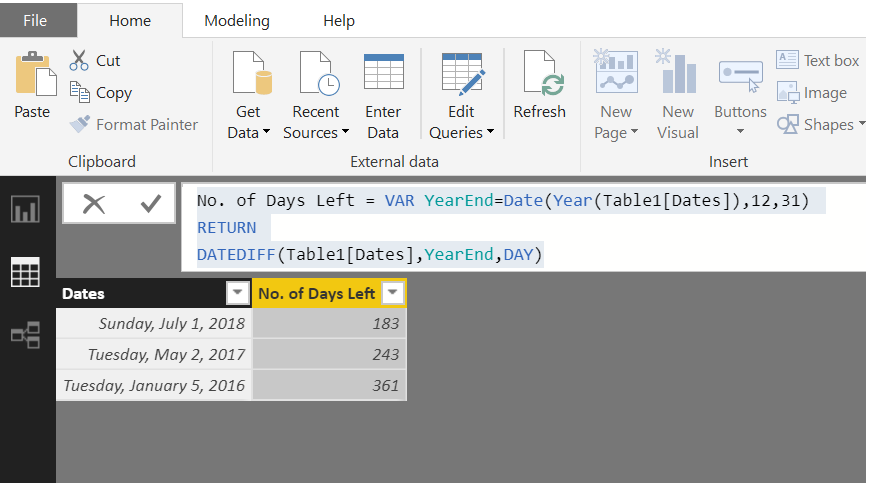
Try this calculated column
No. of Days Left =
VAR YearEnd =
DATE ( YEAR ( Table1[Dates] ), 12, 31 )
RETURN
DATEDIFF ( Table1[Dates], YearEnd, DAY )Hi Zubaid ,
Thanks for your response ,
i have used your expression. but i will need to exclude the weekends and calculate the number of days left for that year.
and also the financial year in my data is April to March .
for example if my start date is April 01 2018 , then i will need to calculate the number of days left for that financial year i.e till 31 March 2019 , Excluding the weekends.
Any thoughts on this ?
Thanks
My apologies for late reply. Too much work in office these days.
Try this revised formula
No. of Days Left =
VAR YearEnd =
IF (
MONTH ( Table1[Dates] ) > 3,
DATE ( YEAR ( Table1[Dates] ) + 1, 3, 31 ),
DATE ( YEAR ( Table1[Dates] ), 3, 31 )
)
VAR days =
ADDCOLUMNS (
GENERATESERIES ( Table1[Dates], YearEnd ),
"WeekDay", WEEKDAY ( [Value], 2 )
)
RETURN
COUNTROWS ( FILTER ( days, [WeekDay] < 6 ) )
Hello ,
I tried implementing the logic given by you.
NetWorkDays =
VAR Calendar3 = CALENDAR(MAX(StartDate),MAX(EndDate))
VAR Calendar4 = ADDCOLUMNS(Calendar3,"WeekDay",WEEKDAY([Date],2))
RETURN COUNTX(FILTER(Calendar4,[WeekDay]<6),[Date])
this seems to be working fine , but now that i have received the new data which has start date and end date as the same date.
i.e Start Date = 03/31/2018 and EndDate = 03/31/2018
so the NetWorkDays should return 0 right ???
but i am getting blank .
any way to correct this ??
i tried doing it with the is blank function , but doesnt work, please help.
Thanks
Just add 0 to the result:
No. of Days Left =
VAR YearEnd =
IF (
MONTH ( Table1[Dates] ) > 3,
DATE ( YEAR ( Table1[Dates] ) + 1, 3, 31 ),
DATE ( YEAR ( Table1[Dates] ), 3, 31 )
)
VAR days =
ADDCOLUMNS (
GENERATESERIES ( Table1[Dates], YearEnd ),
"WeekDay", WEEKDAY ( [Value], 2 )
)
RETURN
COUNTROWS ( FILTER ( days, [WeekDay] < 6 ) ) + 0(It is @Zubair_Muhammad's formula, just added 0 to the result)
The Power BI Data Visualization World Championships is back! Get ahead of the game and start preparing now!
Check out the November 2025 Power BI update to learn about new features.
| User | Count |
|---|---|
| 59 | |
| 46 | |
| 42 | |
| 23 | |
| 17 |
| User | Count |
|---|---|
| 190 | |
| 122 | |
| 96 | |
| 66 | |
| 47 |