Get certified for free when you join Fabric Data Days 2026 and dive into Fabric, Power BI, SQL, AI, and other essential data skills.
Join nowData Days is here! Join us now for 60+ days of learning, challenges, and connection. Learn more
Hi,
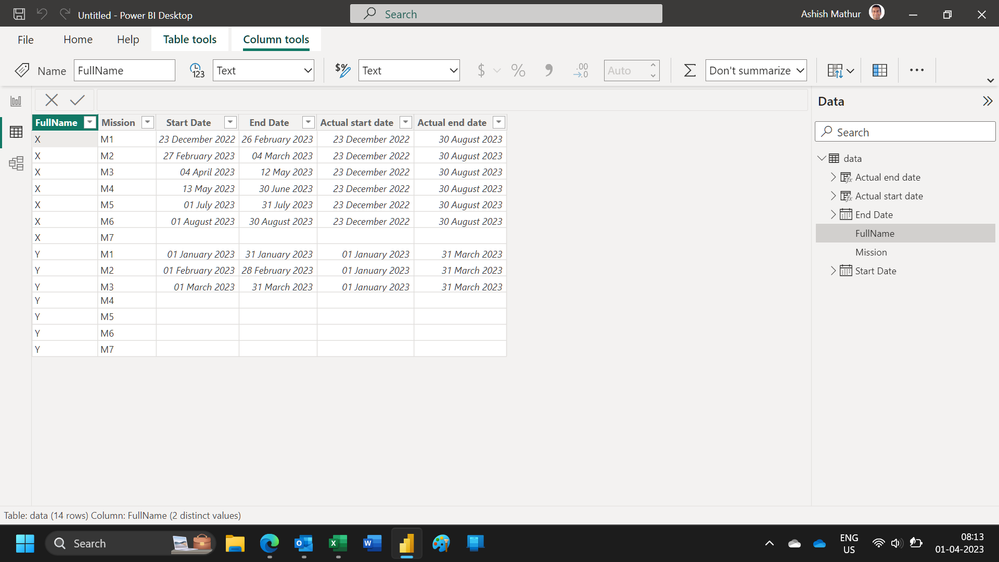
please if i have such Tbl in PBI desctop and I want to add 2 other columns where it will put the first start date in all non blank rows per Full Name and in the other column the last end date in all non blank rows per Full Name (Output in the 2nd snapshot)
1st Snapshot:
| FullName | Mission | Start Date | End Date |
| X | M1 | 23/12/2022 | 26/02/2023 |
| X | M2 | 27/02/2023 | 04/03/2023 |
| X | M3 | 04/04/2023 | 12/05/2023 |
| X | M4 | 13/05/2023 | 30/06/2023 |
| X | M5 | 01/07/2023 | 31/07/2023 |
| X | M6 | 01/08/2023 | 30/08/2023 |
| X | M7 | ||
| Y | M1 | 01/01/2023 | 31/01/2023 |
| Y | M2 | 01/02/2023 | 28/02/2023 |
| Y | M3 | 01/03/2023 | 31/03/2023 |
| Y | M4 | ||
| Y | M5 | ||
| Y | M6 | ||
| Y | M7 |
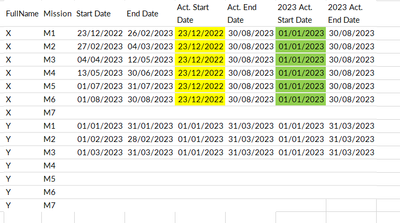
2nd Snapshot:
| FullName | Mission | Start Date | End Date | Act. Start Date | Act. End Date |
| X | M1 | 23/12/2022 | 26/02/2023 | 23/12/2022 | 30/08/2023 |
| X | M2 | 27/02/2023 | 04/03/2023 | 23/12/2022 | 30/08/2023 |
| X | M3 | 04/04/2023 | 12/05/2023 | 23/12/2022 | 30/08/2023 |
| X | M4 | 13/05/2023 | 30/06/2023 | 23/12/2022 | 30/08/2023 |
| X | M5 | 01/07/2023 | 31/07/2023 | 23/12/2022 | 30/08/2023 |
| X | M6 | 01/08/2023 | 30/08/2023 | 23/12/2022 | 30/08/2023 |
| X | M7 | ||||
| Y | M1 | 01/01/2023 | 31/01/2023 | 01/01/2023 | 31/03/2023 |
| Y | M2 | 01/02/2023 | 28/02/2023 | 01/01/2023 | 31/03/2023 |
| Y | M3 | 01/03/2023 | 31/03/2023 | 01/01/2023 | 31/03/2023 |
| Y | M4 | ||||
| Y | M5 | ||||
| Y | M6 | ||||
| Y | M7 |
Solved! Go to Solution.
Hi,
These calculated column formulas work
Actual start date = if(data[Start Date]=BLANK(),BLANK(),CALCULATE(MIN(data[Start Date]),FILTER(data,data[FullName]=EARLIER(data[FullName]))))Actual end date = if(data[Start Date]=BLANK(),BLANK(),CALCULATE(max(data[End Date]),FILTER(data,data[FullName]=EARLIER(data[FullName]))))
Hi,
please if i need to add another 2 Columns called "2023 Actual Start Date" and "2023 Actual End date", where:
he will check:
if Actual end date in 2023 or more (2024,2025..) and Actual start date in 2023 or more, keep the same data
if Actual End date in 2023 or more and Actual start date less than 2023, replace that date with 01/01/2023 in 2023 Actual start date column and keep Actual end date as it is.
output for our previous example will be as follow:
Hi,
Cannot understand your question.
Hi,
These calculated column formulas work
Actual start date = if(data[Start Date]=BLANK(),BLANK(),CALCULATE(MIN(data[Start Date]),FILTER(data,data[FullName]=EARLIER(data[FullName]))))Actual end date = if(data[Start Date]=BLANK(),BLANK(),CALCULATE(max(data[End Date]),FILTER(data,data[FullName]=EARLIER(data[FullName]))))
Don't miss out on Data Days, June 15 through August 7. Learn Fabric, Power BI, SQL, AI and more.
Check out the May 2026 Power BI update to learn about new features.
| User | Count |
|---|---|
| 23 | |
| 23 | |
| 20 | |
| 18 | |
| 14 |
| User | Count |
|---|---|
| 58 | |
| 51 | |
| 41 | |
| 30 | |
| 24 |