Join us at FabCon Atlanta from March 16 - 20, 2026, for the ultimate Fabric, Power BI, AI and SQL community-led event. Save $200 with code FABCOMM.
Register now!The Power BI Data Visualization World Championships is back! Get ahead of the game and start preparing now! Learn more
hello guys, I need to reproduce the result below in power bi
codigo valor resultado
| 10 | 50 | 50 |
| 10 | 50 | |
| 10 | 50 | |
| 20 | 100 | 100 |
| 20 | 100 | |
| 20 | 100 | |
| 20 | 100 |
Solved! Go to Solution.
Hi @Faber13 ,
Please try:
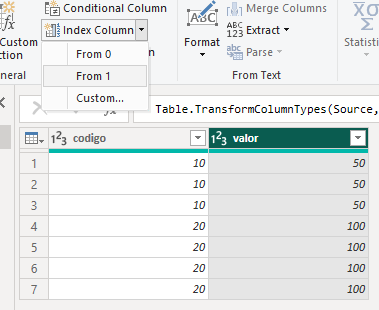
First add an index coolumn:
Then add a column:
resultado = IF([Index]=MINX(FILTER('Table',[codigo]=EARLIER('Table'[codigo])),[Index]),[valor])
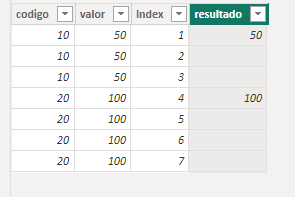
Final output:
Best Regards,
Jianbo Li
If this post helps, then please consider Accept it as the solution to help the other members find it more quickly.
Hi @Faber13 ,
Please try:
First add an index coolumn:
Then add a column:
resultado = IF([Index]=MINX(FILTER('Table',[codigo]=EARLIER('Table'[codigo])),[Index]),[valor])
Final output:
Best Regards,
Jianbo Li
If this post helps, then please consider Accept it as the solution to help the other members find it more quickly.
that was it, thanks 🙂
The Power BI Data Visualization World Championships is back! Get ahead of the game and start preparing now!
| User | Count |
|---|---|
| 44 | |
| 40 | |
| 33 | |
| 30 | |
| 23 |
| User | Count |
|---|---|
| 125 | |
| 119 | |
| 90 | |
| 75 | |
| 69 |