This time we’re going bigger than ever. Fabric, Power BI, SQL, AI and more. We're covering it all. You won't want to miss it.
Learn moreJoin the FabCon + SQLCon recap series. Up next: Power BI, Real-Time Intelligence, IQ and AI, and Data Factory take center stage. All sessions are available on-demand after the live show. Register now
Hey guys,
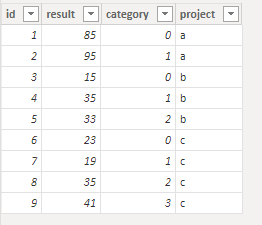
I have following table:
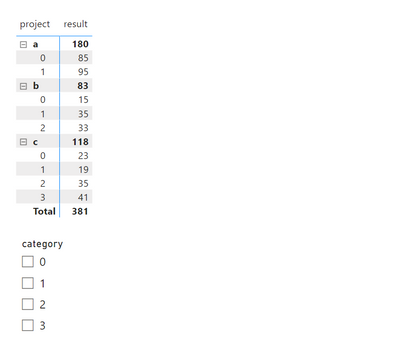
I have a matrix and filter with the following structure:
Now I want to get the following when filtering on category "0" and "2", namely only the records for project "b" and "c" should be visisble.
When I check those filters now I get the following:
But I don't want to see the records/tab for project "a" because there is no record with project "a" and category "2"
Can someone help?
Solved! Go to Solution.
See if this works for you.
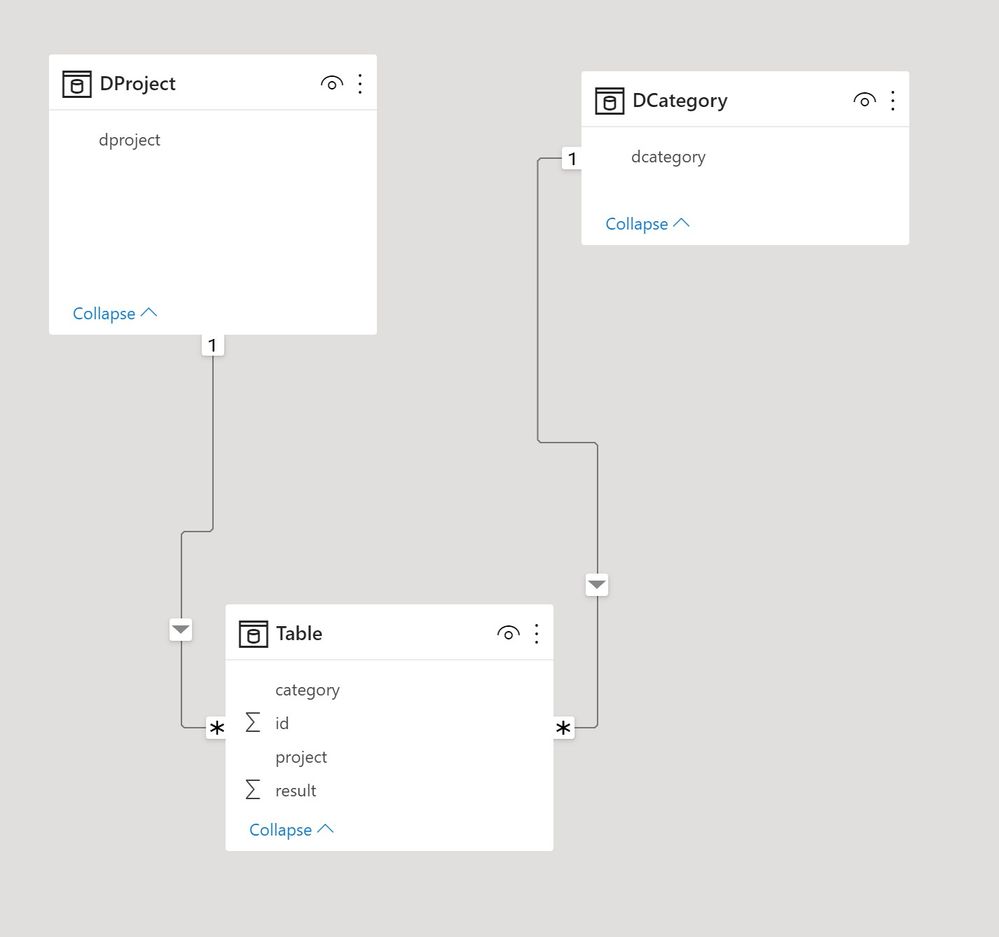
First the model:
Create a measure to use as a filter in the filter pane for the matrix as follows:
FILTER =
VAR DcatRows =
COUNTROWS ( ALLSELECTED ( DCategory ) )
VAR NotFiltered =
DISTINCTCOUNT ( 'Table'[project] )
VAR _Rows =
CALCULATE ( COUNTROWS ( DCategory ), ALL ( 'Table' ) )
RETURN
IF (
DcatRows
= CALCULATE ( COUNT ( 'Table'[project] ), ALLSELECTED ( DCategory[dcategory] ) ),
1,
IF ( _Rows <> DcatRows, BLANK (), NotFiltered )
)
Create the matrix with the rows from the dimension tables, a simple SUM for the values, and add the [FILTER] measure to the filters in the filter pane and set the value to 1:
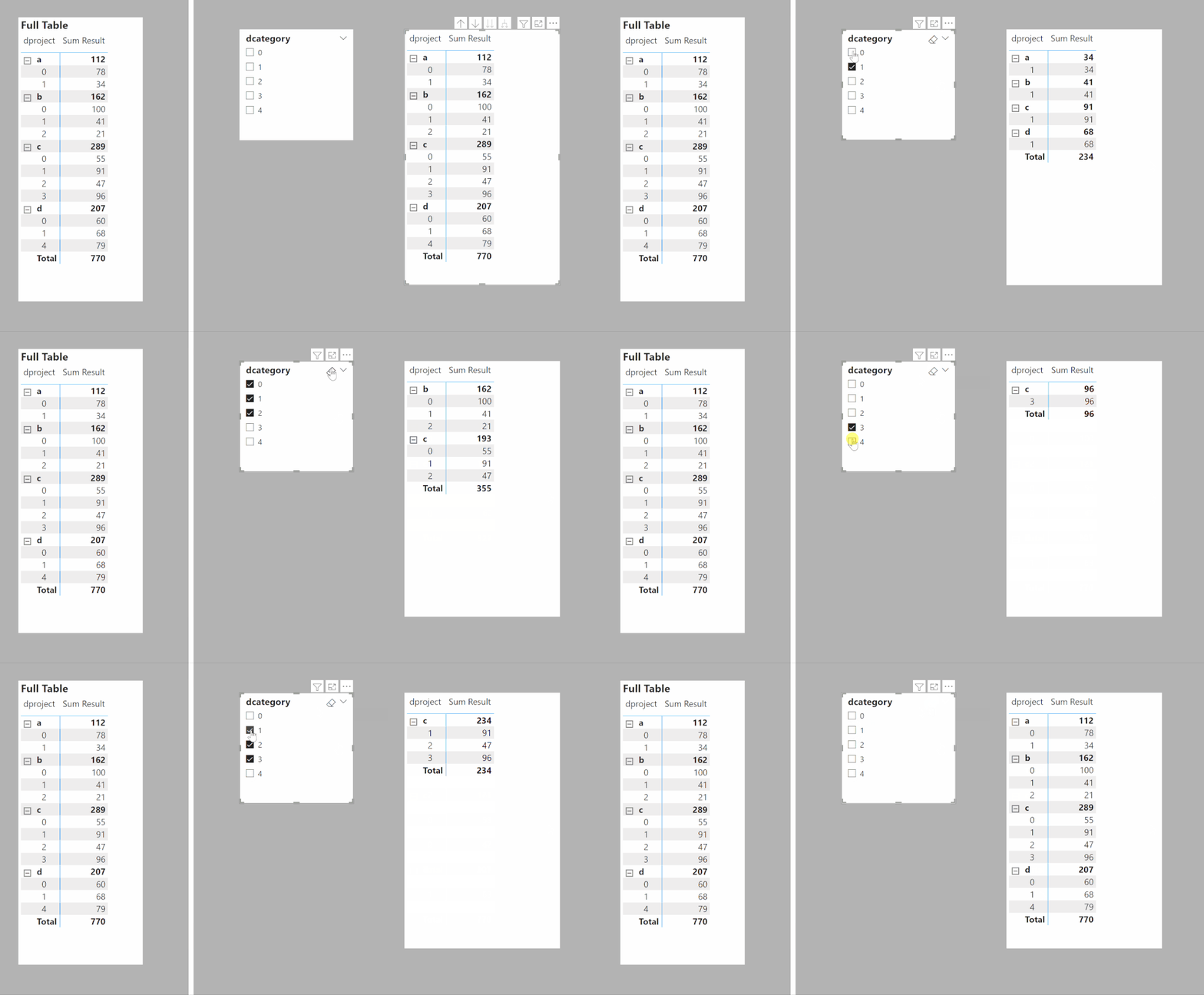
To get:
I've attached the sample PBIX file
Proud to be a Super User!
Paul on Linkedin.
See if this works for you.
First the model:
Create a measure to use as a filter in the filter pane for the matrix as follows:
FILTER =
VAR DcatRows =
COUNTROWS ( ALLSELECTED ( DCategory ) )
VAR NotFiltered =
DISTINCTCOUNT ( 'Table'[project] )
VAR _Rows =
CALCULATE ( COUNTROWS ( DCategory ), ALL ( 'Table' ) )
RETURN
IF (
DcatRows
= CALCULATE ( COUNT ( 'Table'[project] ), ALLSELECTED ( DCategory[dcategory] ) ),
1,
IF ( _Rows <> DcatRows, BLANK (), NotFiltered )
)
Create the matrix with the rows from the dimension tables, a simple SUM for the values, and add the [FILTER] measure to the filters in the filter pane and set the value to 1:
To get:
I've attached the sample PBIX file
Proud to be a Super User!
Paul on Linkedin.
Thank you Paul. This works for me.
One small remark, can I get rid of the Dproject table since it doesn't exist in the filter measure declaration.
You can in principle, though setting up the model with dimension tables (such as Dproject) is recommended and considered a best practice since it makes the model more efficient.
Proud to be a Super User!
Paul on Linkedin.
Hey Paul,
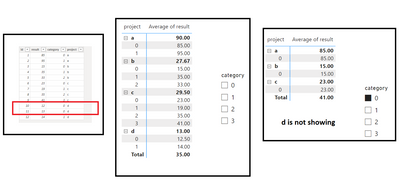
I have only one problem when a project has multiple records with the same category the filter doens't work. This is demonstrated in the screenshot beneath:
Is their a solution for this issue?
@ThomasBruneel , Try a measure like
measure =
var _cnt = countx(allselected(Category), Category[Category])
return
Sumx(filter(Addcolumns(summarize(Table, [project], [Category]), "_1", [result], "_2", countX(filter(allselected(Table), [project] =max([project])), [Category])), [_2] =_cnt),[_1])
You might have use distinctcount
Check out the April 2026 Power BI update to learn about new features.
If you have recently started exploring Fabric, we'd love to hear how it's going. Your feedback can help with product improvements.
A new Power BI DataViz World Championship is coming this June! Don't miss out on submitting your entry.
| User | Count |
|---|---|
| 37 | |
| 37 | |
| 31 | |
| 22 | |
| 15 |
| User | Count |
|---|---|
| 76 | |
| 59 | |
| 32 | |
| 31 | |
| 26 |