Join us at FabCon Atlanta from March 16 - 20, 2026, for the ultimate Fabric, Power BI, AI and SQL community-led event. Save $200 with code FABCOMM.
Register now!The Power BI Data Visualization World Championships is back! Get ahead of the game and start preparing now! Learn more
Hi everyone,
I have data in PowerBI that looks a bit like this:
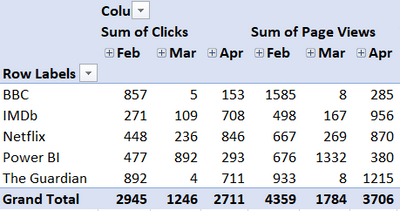
and I want to display it in a matrix like you can in a pivot table like this:
Basically, I want it to gather dates under each category, (rather than what Power BI does which is gather the categories under each date/month like this:
Is there any way around this? It seems kinda basic, but also not really possible.
[I did wonder if a measure could be created which would switch depending on the column, but lack the DAX skills + I'm not sure it gets me any further forward]
Any ideas?
Thank you,
Matt
Solved! Go to Solution.
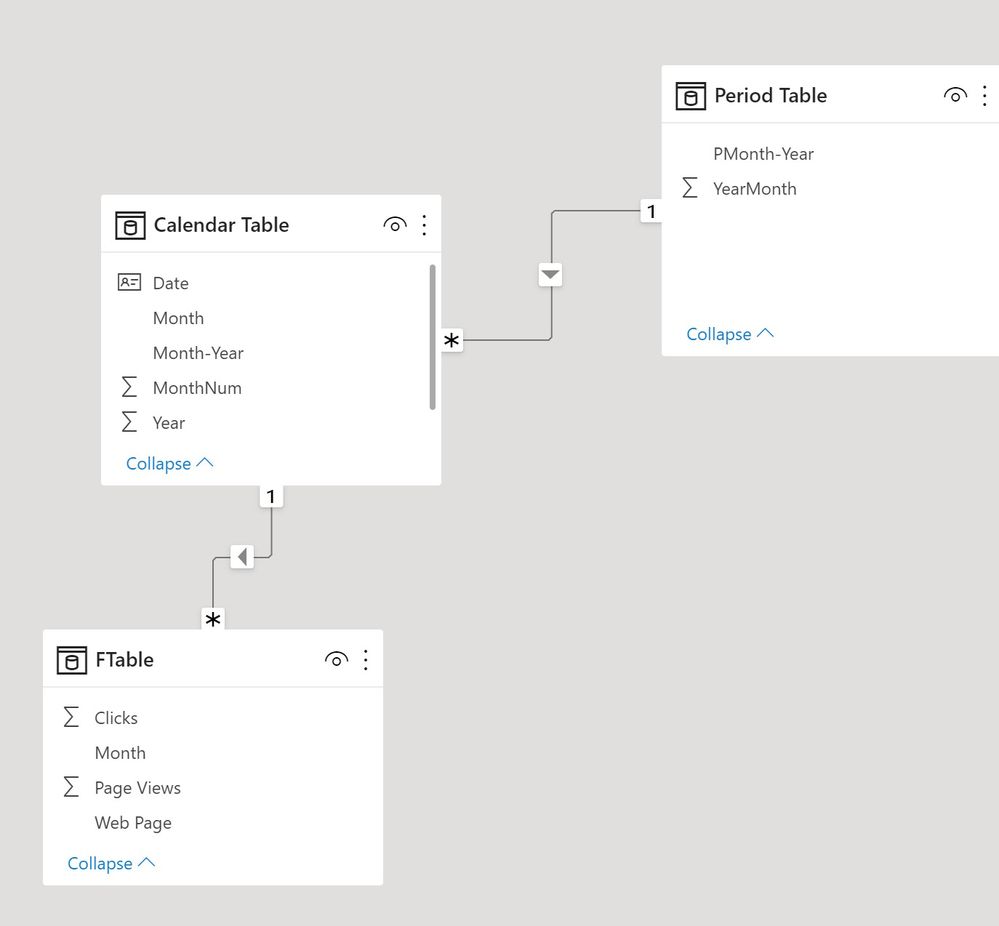
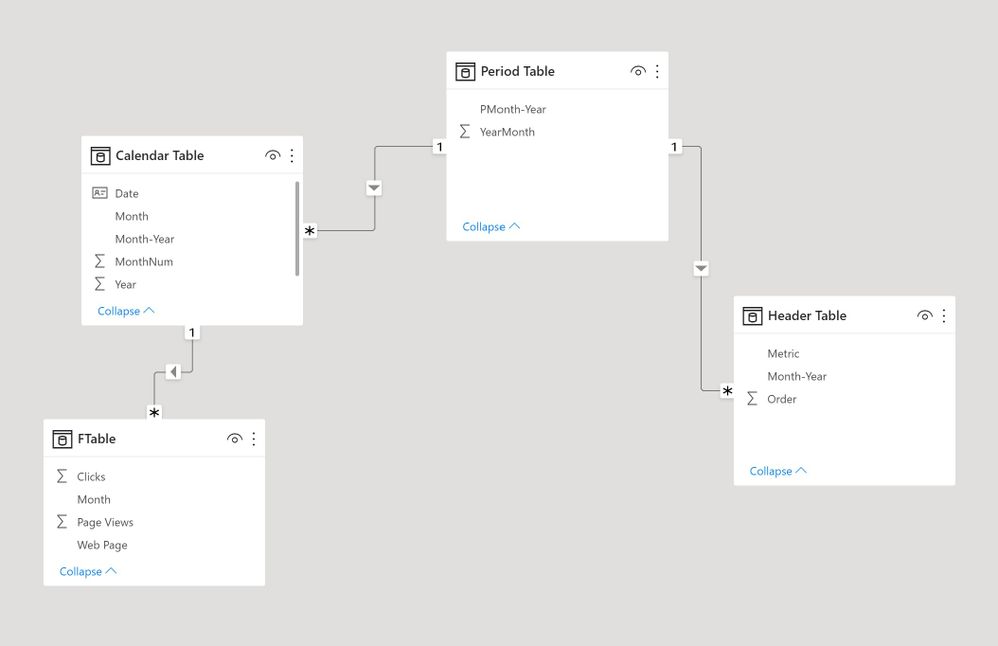
Here is a way. I'm assuming the periods are actual dates, for which I've created a Calendar Table and a Period Table (the latter needed to link to a new header table). If the periods are not dates, all you need in the model is the Period Table.
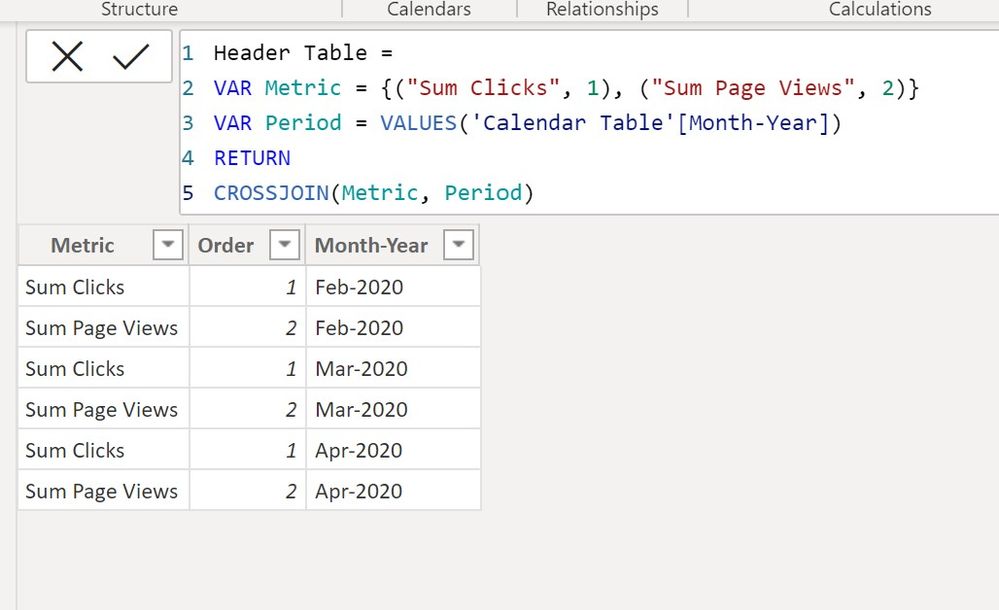
Create a new table using the "New Table" option under Modeling in the ribbon and the following code:
Header Table =
VAR Metric = {("Sum Clicks", 1), ("Sum Page Views", 2)}
VAR Period = VALUES('Calendar Table'[Month-Year])
RETURN
CROSSJOIN(Metric, Period)
Create a relationship between the period table and the corresponding field in the Header Table. The model is as follows:
With simple SUM measures for Clicks and Page Views, create the following measure to use in the matrix visual:
Matrix values =
SWITCH (
SELECTEDVALUE ( 'Header Table'[Order] ),
1, [Sum CLicks],
2, [Sum Page Views]
)
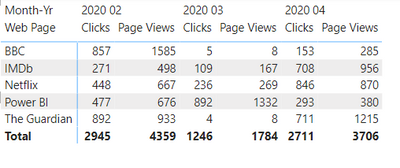
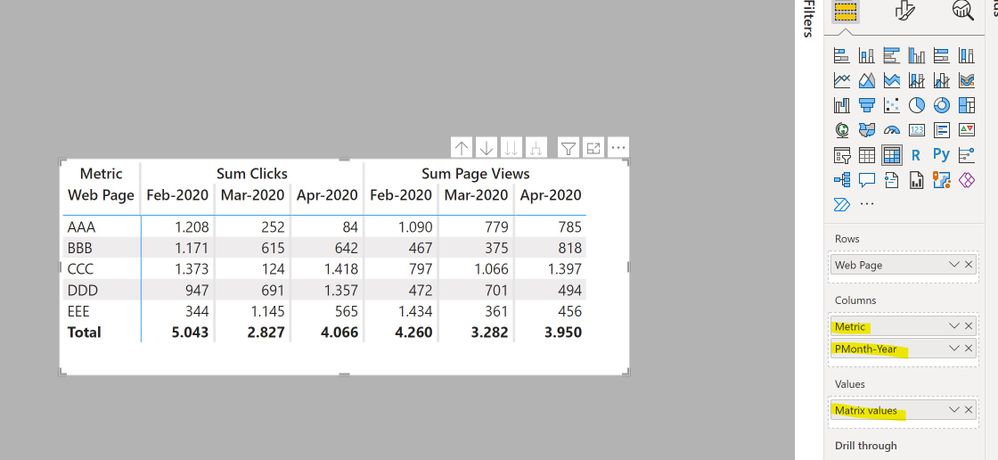
Now create the matrix visual using the web page field, the Metric field from the header table, the Period field from the Period table and the [Matrix Values] measure to get:
I've attached the sample PBIX file
Proud to be a Super User!
Paul on Linkedin.
Here is a way. I'm assuming the periods are actual dates, for which I've created a Calendar Table and a Period Table (the latter needed to link to a new header table). If the periods are not dates, all you need in the model is the Period Table.
Create a new table using the "New Table" option under Modeling in the ribbon and the following code:
Header Table =
VAR Metric = {("Sum Clicks", 1), ("Sum Page Views", 2)}
VAR Period = VALUES('Calendar Table'[Month-Year])
RETURN
CROSSJOIN(Metric, Period)
Create a relationship between the period table and the corresponding field in the Header Table. The model is as follows:
With simple SUM measures for Clicks and Page Views, create the following measure to use in the matrix visual:
Matrix values =
SWITCH (
SELECTEDVALUE ( 'Header Table'[Order] ),
1, [Sum CLicks],
2, [Sum Page Views]
)
Now create the matrix visual using the web page field, the Metric field from the header table, the Period field from the Period table and the [Matrix Values] measure to get:
I've attached the sample PBIX file
Proud to be a Super User!
Paul on Linkedin.
Hi @PaulDBrown,
Thank you so much for all the effort you put into explaining that and making the sample pbix as well. It works!! I even managed to tweak it to include info from two different query tables. I will be bookmarking this one as I know I will use it again.
Just off now to try and find out about CROSSJOIN as I haven't come across that before.
With many thanks and much appreciation,
Matt
Thank you. I did see that one (as was going to use it as a fall-back option). I just already have a lot going on in Power Query (15 min refresh time) so I was hoping for something more DAX based. It just seems like it should be more straightforward to do this so I was hoping someone might have a different approach.
Matt
The Power BI Data Visualization World Championships is back! Get ahead of the game and start preparing now!
Check out the November 2025 Power BI update to learn about new features.
| User | Count |
|---|---|
| 59 | |
| 46 | |
| 42 | |
| 23 | |
| 17 |
| User | Count |
|---|---|
| 190 | |
| 122 | |
| 96 | |
| 66 | |
| 47 |