cancel
Showing results for 
Search instead for 
Did you mean: 

July 7 - July 17 | Round 2 of the Power BI Dataviz World Championships. Don't miss your chance! Learn more

Reply
Anonymous
Not applicable

fields list

Hello, I have a table in power bi and I would like to know how to get the fields list of this table and export it to excel

Regards,

1 ACCEPTED SOLUTION
v-yulgu-msft
Microsoft Employee
Microsoft Employee

Hi @Anonymous,


Based on my understanding, you want to get the list of all field names contained by a dataset table, right?


If so, you can achieve this in Query Editor mode.


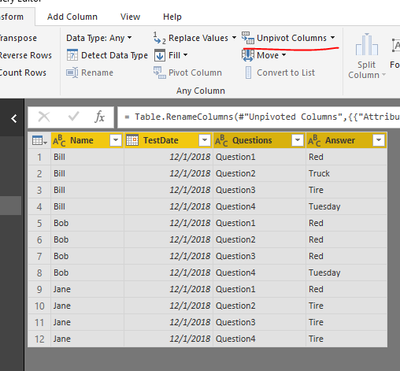
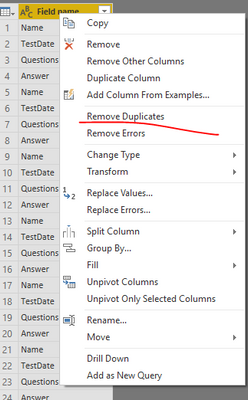
Duplicate the source table, and apply all changes to the duplicated one. Select all fields at the same time, then, click "unpivot columns". Rename the new columns and remove unnecessary columns. And you need to remove the duplicates of field names.

1.PNG3.PNG


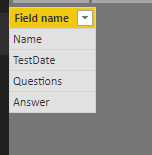
You would get such a table.

2.PNG


In Power BI desktop, it is only supported to export visual data to CSV. You can add above data into a table visual, publish report to Power BI service, then, you could export summarized/underlying data into Excel or CSV file.


Best regards,

Yuliana Gu

Community Support Team _ Yuliana Gu
If this post helps, then please consider Accept it as the solution to help the other members find it more quickly.

View solution in original post

1 REPLY 1
v-yulgu-msft
Microsoft Employee
Microsoft Employee

Hi @Anonymous,


Based on my understanding, you want to get the list of all field names contained by a dataset table, right?


If so, you can achieve this in Query Editor mode.


Duplicate the source table, and apply all changes to the duplicated one. Select all fields at the same time, then, click "unpivot columns". Rename the new columns and remove unnecessary columns. And you need to remove the duplicates of field names.

1.PNG3.PNG


You would get such a table.

2.PNG


In Power BI desktop, it is only supported to export visual data to CSV. You can add above data into a table visual, publish report to Power BI service, then, you could export summarized/underlying data into Excel or CSV file.


Best regards,

Yuliana Gu

Community Support Team _ Yuliana Gu
If this post helps, then please consider Accept it as the solution to help the other members find it more quickly.

Helpful resources

Announcements
FabCon and SQLCon Barcelona 2026

FabCon & SQLCon – Barcelona 2026

Join us in Barcelona for FabCon and SQLCon, the Fabric, Power BI, SQL, and AI community event. Save €200 with code FABCMTY200.

60 days of Data Days Carousel

Data Days 2026

Join Fabric Data Days 2026: 60 days of free live/on-demand sessions, challenges, study groups, and certification opportunities.

Power BI DataViz World Championships carousel

Power BI DataViz World Championships - June 2026

A new Power BI DataViz World Championship is coming this June! Don't miss out on submitting your entry.