Share feedback directly with Fabric product managers, participate in targeted research studies and influence the Fabric roadmap.
Sign up nowGet Fabric certified for FREE! Don't miss your chance! Learn more
Hello, I have a table in power bi and I would like to know how to get the fields list of this table and export it to excel
Regards,
Solved! Go to Solution.
Hi @Anonymous,
Based on my understanding, you want to get the list of all field names contained by a dataset table, right?
If so, you can achieve this in Query Editor mode.
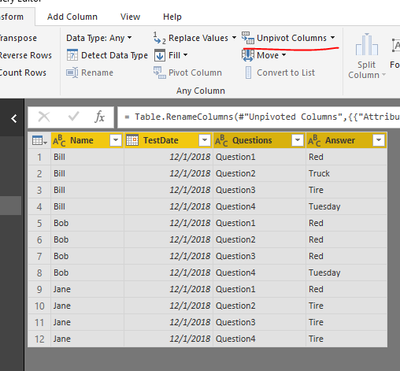
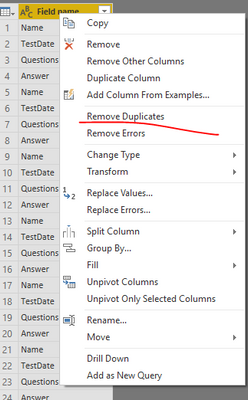
Duplicate the source table, and apply all changes to the duplicated one. Select all fields at the same time, then, click "unpivot columns". Rename the new columns and remove unnecessary columns. And you need to remove the duplicates of field names.
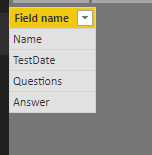
You would get such a table.
In Power BI desktop, it is only supported to export visual data to CSV. You can add above data into a table visual, publish report to Power BI service, then, you could export summarized/underlying data into Excel or CSV file.
Best regards,
Yuliana Gu
Hi @Anonymous,
Based on my understanding, you want to get the list of all field names contained by a dataset table, right?
If so, you can achieve this in Query Editor mode.
Duplicate the source table, and apply all changes to the duplicated one. Select all fields at the same time, then, click "unpivot columns". Rename the new columns and remove unnecessary columns. And you need to remove the duplicates of field names.
You would get such a table.
In Power BI desktop, it is only supported to export visual data to CSV. You can add above data into a table visual, publish report to Power BI service, then, you could export summarized/underlying data into Excel or CSV file.
Best regards,
Yuliana Gu
Share feedback directly with Fabric product managers, participate in targeted research studies and influence the Fabric roadmap.
| User | Count |
|---|---|
| 63 | |
| 62 | |
| 42 | |
| 19 | |
| 16 |
| User | Count |
|---|---|
| 118 | |
| 106 | |
| 38 | |
| 28 | |
| 27 |