Get certified for free when you join Fabric Data Days 2026 and dive into Fabric, Power BI, SQL, AI, and other essential data skills.
Join nowJuly 7 - July 17 | Round 2 of the Power BI Dataviz World Championships. Don't miss your chance! Learn more
I'm using DATEDIFF to find the number of days between today and dates in column however the column also has some values that are text therefore the the calculation doesn't work.
Can anyone advise how values with text can be exluded so that the Date difference will work on the values that are dates?
Column = DATEDIFF(Table1[Expiry],today(),DAY)
Solved! Go to Solution.
Hey @TIGER8855
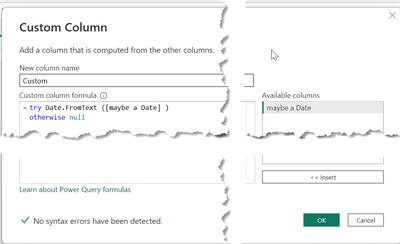
you can do this with two steps in Power Query, create a new column with this code
try Date.FromText ([maybe a Date] )
otherwise null
Then change the data type to Date
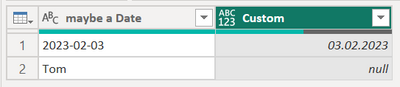
This result might look like this:
Hopefully this provides what you are looking for.
Regards,
Tom
Hey @TIGER8855 ,
this will not work because the DATEDIFF function requires the argument to be either of data type DATE or DATETIME: DATEDIFF – DAX Guide
Regards,
Tom
Thanks @TomMartens . Do you know what is the easiest way to create a new column with just the dates and if there is text, the cell in the new column is blank? This way I can use the DATEDIFF on the new column with only the dates.
Hey @TIGER8855
you can do this with two steps in Power Query, create a new column with this code
try Date.FromText ([maybe a Date] )
otherwise null
Then change the data type to Date
This result might look like this:
Hopefully this provides what you are looking for.
Regards,
Tom
Thanks @TomMartens. That works. My original DATEDIFF can now be used on this new column.
Join us in Barcelona for FabCon and SQLCon, the Fabric, Power BI, SQL, and AI community event. Save €200 with code FABCMTY200.
Join Data Days 2026: 60 days of free live/on-demand sessions, challenges, study groups, and certification opportunities.
| User | Count |
|---|---|
| 29 | |
| 27 | |
| 26 | |
| 24 | |
| 16 |
| User | Count |
|---|---|
| 53 | |
| 47 | |
| 39 | |
| 31 | |
| 21 |