This is best Fabric, Power BI, SQL and AI community event. How do we know? The last event sold out! Save €200 with code FABCMTY200.
Register nowA new Data Days event is coming soon! This time we’re going bigger than ever. Fabric, Power BI, SQL, AI and more. Don't miss out.
I'm using DATEDIFF to find the number of days between today and dates in column however the column also has some values that are text therefore the the calculation doesn't work.
Can anyone advise how values with text can be exluded so that the Date difference will work on the values that are dates?
Column = DATEDIFF(Table1[Expiry],today(),DAY)
Solved! Go to Solution.
Hey @TIGER8855
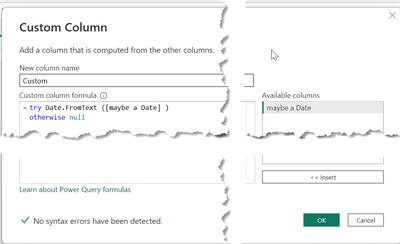
you can do this with two steps in Power Query, create a new column with this code
try Date.FromText ([maybe a Date] )
otherwise null
Then change the data type to Date
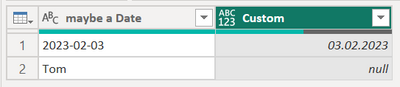
This result might look like this:
Hopefully this provides what you are looking for.
Regards,
Tom
Hey @TIGER8855 ,
this will not work because the DATEDIFF function requires the argument to be either of data type DATE or DATETIME: DATEDIFF – DAX Guide
Regards,
Tom
Thanks @TomMartens . Do you know what is the easiest way to create a new column with just the dates and if there is text, the cell in the new column is blank? This way I can use the DATEDIFF on the new column with only the dates.
Hey @TIGER8855
you can do this with two steps in Power Query, create a new column with this code
try Date.FromText ([maybe a Date] )
otherwise null
Then change the data type to Date
This result might look like this:
Hopefully this provides what you are looking for.
Regards,
Tom
Thanks @TomMartens. That works. My original DATEDIFF can now be used on this new column.
Check out the May 2026 Power BI update to learn about new features.
Sign up to receive a private message when registration opens and key events begin.
If you have recently started exploring Fabric, we'd love to hear how it's going. Your feedback can help with product improvements.
| User | Count |
|---|---|
| 30 | |
| 28 | |
| 23 | |
| 19 | |
| 17 |
| User | Count |
|---|---|
| 48 | |
| 46 | |
| 41 | |
| 21 | |
| 18 |