cancel
Showing results for 
Search instead for 
Did you mean: 

Get Fabric Certified for FREE during Fabric Data Days. Don't miss your chance! Request now

Reply
sdhn
Responsive Resident
Responsive Resident

distribute data into two columns

ello All,


I am using Power Bi desktop to create a dashbaord.


My source table has a column called Customer and has valuses as:


Micheal Lim   Feb 29

....

...


I want to saparate date (Feb  29)  in other new column. will call date.


So two columns will be same as below:

Column_____________ "Customer"   ----   "Date"

Row_________________Micheal Lim ------   Feb 29


Please advise thanks


1 ACCEPTED SOLUTION

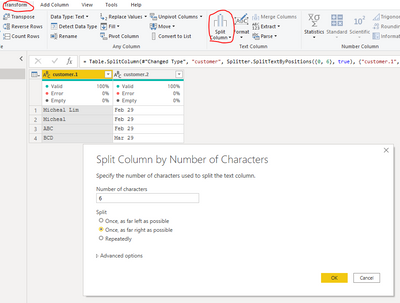
Please try to do like below in query editor:

Vlianlmsft_0-1625125918096.png


View solution in original post

4 REPLIES 4
themistoklis
Community Champion
Community Champion

@sdhn 


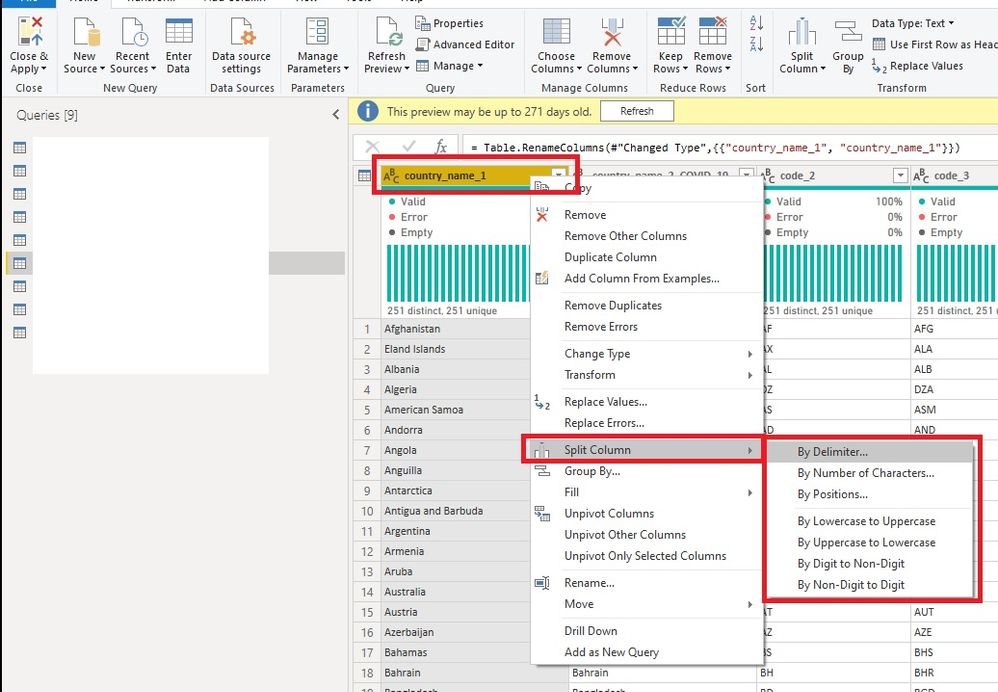
Try to separate them using Power Query. Go to Home --> Transform Data


Click on the table on Power Query and select the column that you want to split.

Right click on it --> Split Column --> Select Split Method (maybe delimiter will be suitable in your case)


See image below

Split.jpg

sdhn
Responsive Resident
Responsive Resident

I want to create other column called Date and moved all dates to Date column.


Current Customer column has values as below:


Micheal Lim   Feb 29

....

...

Please try to do like below in query editor:

Vlianlmsft_0-1625125918096.png


AlexisOlson
Super User
Super User

Can you give a few more examples of input rows? The exact format and number of spaces make a difference in how to split the column.

Helpful resources

Announcements
November Power BI Update Carousel

Power BI Monthly Update - November 2025

Check out the November 2025 Power BI update to learn about new features.

Fabric Data Days Carousel

Fabric Data Days

Advance your Data & AI career with 50 days of live learning, contests, hands-on challenges, study groups & certifications and more!

FabCon Atlanta 2026 carousel

FabCon Atlanta 2026

Join us at FabCon Atlanta, March 16-20, for the ultimate Fabric, Power BI, AI and SQL community-led event. Save $200 with code FABCOMM.

Top Solution Authors
Top Kudoed Authors