Join us at FabCon Atlanta from March 16 - 20, 2026, for the ultimate Fabric, Power BI, AI and SQL community-led event. Save $200 with code FABCOMM.
Register now!Get Fabric Certified for FREE during Fabric Data Days. Don't miss your chance! Request now
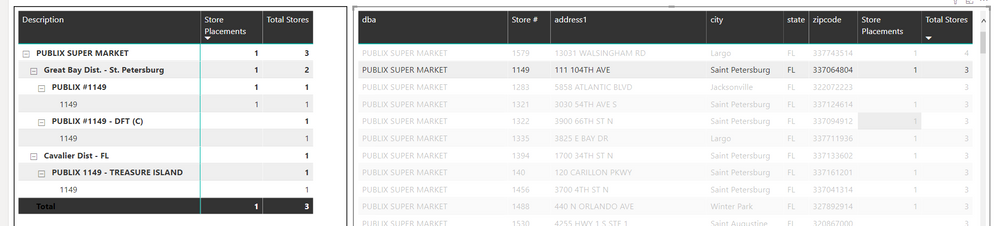
I have some dataset with Distributors (Parent) and stores (child). I'm trying to get a distinct count of just the child stores. The problem is my data Parent + Child = Unique Key. There are multiple Distributors tied to one Store.
My Code
Total Stores = CALCULATE(DISTINCTCOUNT(Fact_outdas[account]))
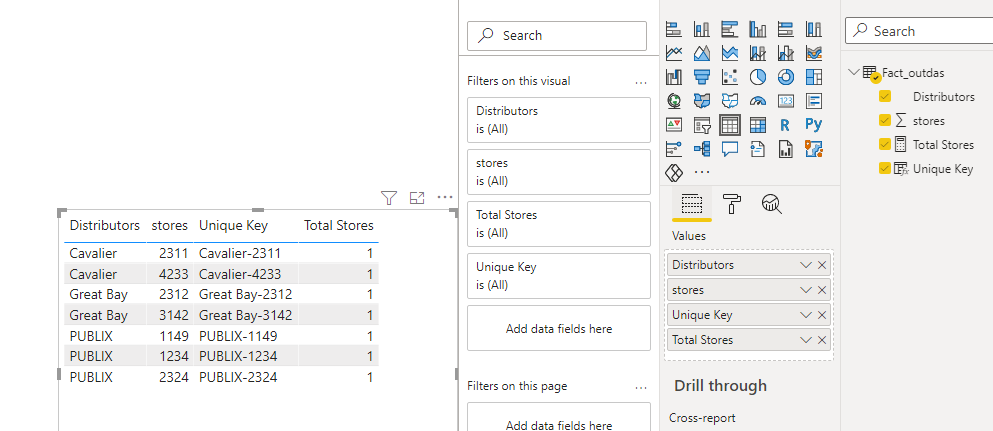
This is how my data looks
I'm trying to get a total store count of 1 for that line item.
Solved! Go to Solution.
Hi,
According to your description, I can roughly understand your requirement, you want to get the Distinct Count for each store in the table chart, right? I think you can try this measure:
Total Stores =
CALCULATE(DISTINCTCOUNT(Fact_outdas[stores]),FILTER(ALL(Fact_outdas),[stores]=MAX('Fact_outdas'[stores])))
And you can get what you want.
You can download my test pbix file below
If this result is not what you want, you can post some sample data(without sensitive data) and your expected result.
How to Get Your Question Answered Quickly
Thank you very much!
Best Regards,
Community Support Team _Robert Qin
If this post helps, then please consider Accept it as the solution to help the other members find it more quickly.
Hi,
According to your description, I can roughly understand your requirement, you want to get the Distinct Count for each store in the table chart, right? I think you can try this measure:
Total Stores =
CALCULATE(DISTINCTCOUNT(Fact_outdas[stores]),FILTER(ALL(Fact_outdas),[stores]=MAX('Fact_outdas'[stores])))
And you can get what you want.
You can download my test pbix file below
If this result is not what you want, you can post some sample data(without sensitive data) and your expected result.
How to Get Your Question Answered Quickly
Thank you very much!
Best Regards,
Community Support Team _Robert Qin
If this post helps, then please consider Accept it as the solution to help the other members find it more quickly.
@tqn626 , I do not see column Distributors and store in your DB.
if that is the key then count is
countrows(summarize(Table, Table[Distributors], Table[Store]))
Check out the November 2025 Power BI update to learn about new features.
Advance your Data & AI career with 50 days of live learning, contests, hands-on challenges, study groups & certifications and more!