
Don't miss your chance to take exam DP-600 or DP-700 on us!
Request nowLearn from the best! Meet the four finalists headed to the FINALS of the Power BI Dataviz World Championships! Register now
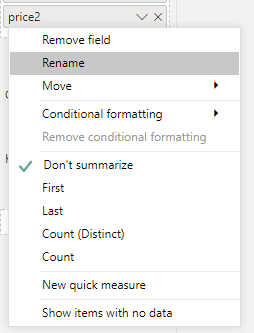
I have two tabulars and there are a column(tabular1 has price1 and tabular2 has price2 ) in each tabular which has the same data type but when I try to use them in report(two different reports) it shows different options when I right click on them :
both price1 and price2 has the same defined data type in tabular and sql view:
Why it shows different properties? and what should I do to get same price1 properties(left picture) on price2(right picture)?
Solved! Go to Solution.
Hi @Anonymous
In addition to amitchandak 's reply. Your price 2 may in Text type.
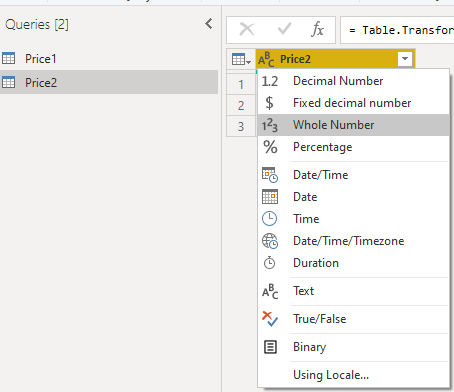
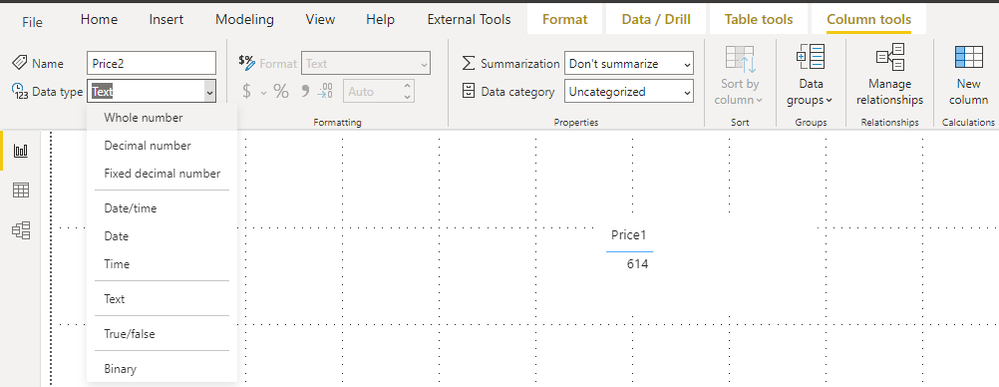
You can change the type in Power Query Editor or Column Tools.
Power Query Editor:
Column Tools:
Best Regards,
Rico Zhou
If this post helps, then please consider Accept it as the solution to help the other members find it more quickly.
Hi @Anonymous
Could you tell me if your problem has been solved? If it is, kindly Accept it as the solution. More people will benefit from it. Or you are still confused about it, please provide me with more details about your table and your problem or share me with your pbix file from your Onedrive for Business.
Best Regards,
Rico Zhou
Hi @Anonymous
In addition to amitchandak 's reply. Your price 2 may in Text type.
You can change the type in Power Query Editor or Column Tools.
Power Query Editor:
Column Tools:
Best Regards,
Rico Zhou
If this post helps, then please consider Accept it as the solution to help the other members find it more quickly.
@Anonymous , Data type is not visible for both.
But this happens with measure create in the tabular edition or with Data type - Text
Please provide your feedback comments and advice for new videos
Tutorial Series Dax Vs SQL Direct Query PBI Tips
Appreciate your Kudos.
Share feedback directly with Fabric product managers, participate in targeted research studies and influence the Fabric roadmap.
Check out the February 2026 Power BI update to learn about new features.
| User | Count |
|---|---|
| 54 | |
| 47 | |
| 38 | |
| 16 | |
| 15 |
| User | Count |
|---|---|
| 81 | |
| 71 | |
| 38 | |
| 28 | |
| 25 |