This time we’re going bigger than ever. Fabric, Power BI, SQL, AI and more. We're covering it all. You won't want to miss it.
Learn moreLevel up your Power BI skills this month - build one visual each week and tell better stories with data! Get started
Dear All,
I need to count the difference in days between two date columns which belongs to two different tables.
Is there an easy way I can get this through a simple dax query without creating calculated columns?
Thank you a lot
gianmarco
Solved! Go to Solution.
Hi @gianmarco ,
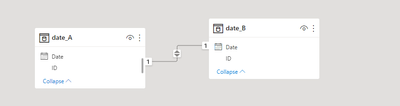
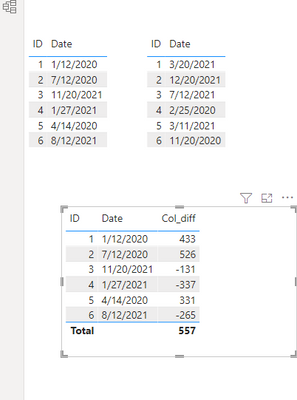
According to your description, the date difference between two different tables is required to satisfy some specific conditions (inter-table relationship, date type, etc.). Otherwise dax's calculation logic cannot know which two date differences need to be calculated. The best solution is to use the datadiff function to create a calculated column. refer to the following test results.
Col_diff = DATEDIFF(date_A[Date],RELATED(date_B[Date]),DAY)
Or you can try @amitchandak blog link, which is also a good reference
If the problem is still not resolved, please provide detailed error information and test data. Looking forward to your reply.
Best Regards,
Henry
If this post helps, then please consider Accept it as the solution to help the other members find it more quickly.
Hi @gianmarco ,
According to your description, the date difference between two different tables is required to satisfy some specific conditions (inter-table relationship, date type, etc.). Otherwise dax's calculation logic cannot know which two date differences need to be calculated. The best solution is to use the datadiff function to create a calculated column. refer to the following test results.
Col_diff = DATEDIFF(date_A[Date],RELATED(date_B[Date]),DAY)
Or you can try @amitchandak blog link, which is also a good reference
If the problem is still not resolved, please provide detailed error information and test data. Looking forward to your reply.
Best Regards,
Henry
If this post helps, then please consider Accept it as the solution to help the other members find it more quickly.
Check out the April 2026 Power BI update to learn about new features.
Sign up to receive a private message when registration opens and key events begin.
If you have recently started exploring Fabric, we'd love to hear how it's going. Your feedback can help with product improvements.
| User | Count |
|---|---|
| 37 | |
| 30 | |
| 29 | |
| 21 | |
| 18 |
| User | Count |
|---|---|
| 68 | |
| 45 | |
| 33 | |
| 24 | |
| 23 |