This is best Fabric, Power BI, SQL and AI community event. How do we know? The last event sold out! Save €200 with code FABCMTY200.
Register nowThe Fabric community is now in read-only for platform upgrade. Learn more
Good Morning to everyone from Italy
apologize for my bad English
i ask for a help or a suggestion.
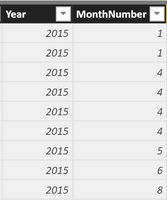
at the end of every month i export from my datawarehouse to Excel two tables with sales information that i use to create reports for my CEO.
Now i'm starting to use PowerBI but and i'm a little bit in trouble with the concept of DATE
i would like to create a calendar table but here's my problem:
the colum Year and Month are text formatted.
how i can convert to date format ?
is possible ?
Thanks
Solved! Go to Solution.
You can add a New Column for example
Column = DATE ( VALUE ( [Year] ), VALUE ( [MonthNumber] ), 1 )
Hi,
Write this calculated column formula
=1*("1/"&[MonthNumber]&"/"&[Year])
Format this column as Date.
Hi,
Write this calculated column formula
=1*("1/"&[MonthNumber]&"/"&[Year])
Format this column as Date.
thanks to all of you for your kindly answers, both working.
last question, if i create a new table "Calendar" with the function "CALENDARAUTO ()" I obtain an error
message "the function is not able to find a base column DateTime in the model"
i dont understand well why i obtain this error
Regard from Italy
Matteo
You can add a New Column for example
Column = DATE ( VALUE ( [Year] ), VALUE ( [MonthNumber] ), 1 )
Join us in Barcelona for FabCon and SQLCon, the Fabric, Power BI, SQL, and AI community event. Save €200 with code FABCMTY200.
| User | Count |
|---|---|
| 23 | |
| 22 | |
| 14 | |
| 14 | |
| 13 |
| User | Count |
|---|---|
| 47 | |
| 39 | |
| 24 | |
| 20 | |
| 20 |