This is best Fabric, Power BI, SQL and AI community event. How do we know? The last event sold out! Save €200 with code FABCMTY200.
Register nowThe Fabric community is upgrading! Read all of the details including the timeline and what you can expect. Learn more
Good Morning to everyone from Italy
apologize for my bad English
i ask for a help or a suggestion.
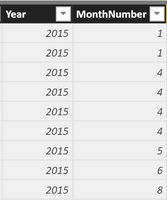
at the end of every month i export from my datawarehouse to Excel two tables with sales information that i use to create reports for my CEO.
Now i'm starting to use PowerBI but and i'm a little bit in trouble with the concept of DATE
i would like to create a calendar table but here's my problem:
the colum Year and Month are text formatted.
how i can convert to date format ?
is possible ?
Thanks
Solved! Go to Solution.
You can add a New Column for example
Column = DATE ( VALUE ( [Year] ), VALUE ( [MonthNumber] ), 1 )
Hi,
Write this calculated column formula
=1*("1/"&[MonthNumber]&"/"&[Year])
Format this column as Date.
Hi,
Write this calculated column formula
=1*("1/"&[MonthNumber]&"/"&[Year])
Format this column as Date.
thanks to all of you for your kindly answers, both working.
last question, if i create a new table "Calendar" with the function "CALENDARAUTO ()" I obtain an error
message "the function is not able to find a base column DateTime in the model"
i dont understand well why i obtain this error
Regard from Italy
Matteo
You can add a New Column for example
Column = DATE ( VALUE ( [Year] ), VALUE ( [MonthNumber] ), 1 )
Join us in Barcelona for FabCon and SQLCon, the Fabric, Power BI, SQL, and AI community event. Save €200 with code FABCMTY200.
| User | Count |
|---|---|
| 24 | |
| 22 | |
| 20 | |
| 18 | |
| 14 |
| User | Count |
|---|---|
| 29 | |
| 23 | |
| 22 | |
| 20 | |
| 20 |