cancel
Showing results for 
Search instead for 
Did you mean: 

Learn from the best! Meet the four finalists headed to the FINALS of the Power BI Dataviz World Championships! Register now

Reply
erezb
Frequent Visitor

data sql source

 Hello


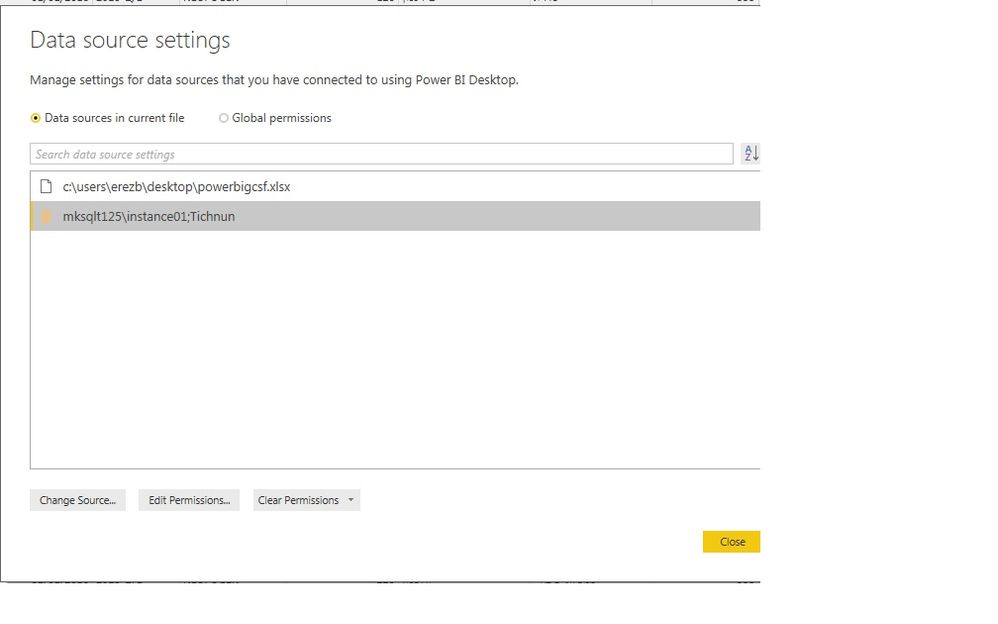
Why Can't I see the table name in sql data source.

As you can see when connecting to excel Datasource I see full path.

In the sql connection I get only the DB name (tichnun).

It's helpful to know the table name when changes are needed in the table creation process inside Sql.


Ds.jpg 


Thanks

Erez


1 ACCEPTED SOLUTION
Anonymous
Not applicable

No, that's the name of the query, and the name of the resulting table in your Power BI data model. The name of the table is found in the navigation step of the query. The query steps are below the query name on the right hand side.


https://powerbi.microsoft.com/en-us/documentation/powerbi-desktop-query-overview/

View solution in original post

5 REPLIES 5
Anonymous
Not applicable

Individual queries may select from one or more tables. The data source/connection isn't a single table; it's the database. If you want to see navigation to a specific table you'll need to look at the query that uses it.

hi

again


I have entered the query editor. In the right side I see "name" ' but this field can be edited so it doesn't correspont neccessarily

to the table name from where the data was imported.

Have you meant this field or is there another location when I can see the table name?


Thanks again

Erez

Anonymous
Not applicable

No, that's the name of the query, and the name of the resulting table in your Power BI data model. The name of the table is found in the navigation step of the query. The query steps are below the query name on the right hand side.


https://powerbi.microsoft.com/en-us/documentation/powerbi-desktop-query-overview/

Thank you ! 

Anonymous
Not applicable

Or to put it another way, a data source is just a connection to a database. It isn't the data itself. It's the phone line, not the conversation.

Helpful resources

Announcements
Join our Fabric User Panel

Join our Fabric User Panel

Share feedback directly with Fabric product managers, participate in targeted research studies and influence the Fabric roadmap.

February Power BI Update Carousel

Power BI Monthly Update - February 2026

Check out the February 2026 Power BI update to learn about new features.

FabCon Atlanta 2026 carousel

FabCon Atlanta 2026

Join us at FabCon Atlanta, March 16-20, for the ultimate Fabric, Power BI, AI and SQL community-led event. Save $200 with code FABCOMM.