
cancel
Showing results for 
Search instead for 
Did you mean: 

The Power BI Data Visualization World Championships is back! Get ahead of the game and start preparing now! Learn more

Reply
Tasos
Helper II
Helper II

create dynamic output

Hello,


I am trying to create something that someone must have done it before. I have seen that there are some similar topics but none of them made me solve my problem 😞 .


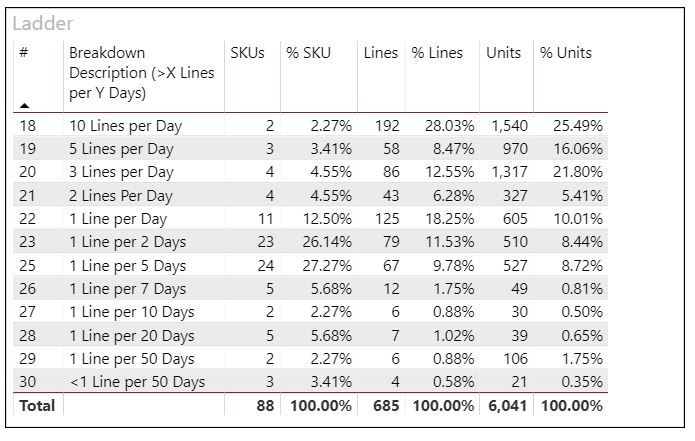
I want to create a dynamic output like the one below (1st group has all the SKUs with more than 10lines per day, the 2nd group has these SKUs with less than 10 and more than 5 lines per day, etc.)

1.JPG

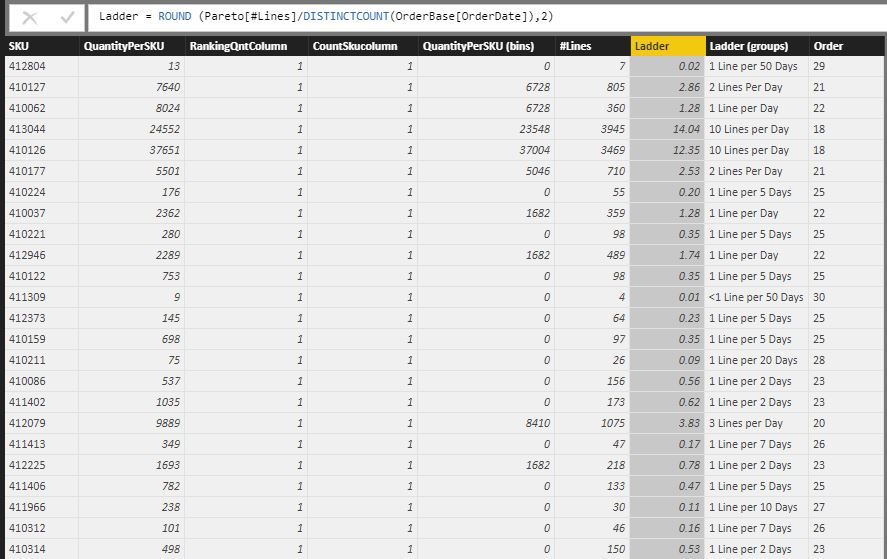
My first approach was to create the value (Ladder) and based on that the grouping as a column. 

2.JPG


However, this is not dynamic as when I apply filters, the "ladder" and the "grouping" remain unchangeable as they are calculated based on the original total values. Therefore, I thought to create a measure instead of a column (probably something like the one below??) I am missing on how I can create the table I want from the measure (if this is the correct approach).


3.JPG 


Hopefully, it is clear what I need.


Thank you

1 ACCEPTED SOLUTION

Hello, I have found what I was looking for. I used the following link and it shows in detail the steps.


https://www.youtube.com/watch?v=0HR_h6YTjzc


Thank you

View solution in original post

3 REPLIES 3
v-jiascu-msft
Microsoft Employee
Microsoft Employee

Hi @Tasos,


Can you share the pbix file please?

What's the table 'OrderBase' like?


Best Regards,

Dale

Community Support Team _ Dale
If this post helps, then please consider Accept it as the solution to help the other members find it more quickly.

Hi @v-jiascu-msft,


Thank you for helping me.


The "orderbase" file is the original file containing details of the orders I want to analyse (per ordernumber). I have summarised it in SKU level (Pareto table) and from this I am trying to create the desired output.


I tried to share the file but haven't hound how.


Thanks,

Tasos

Hello, I have found what I was looking for. I used the following link and it shows in detail the steps.


https://www.youtube.com/watch?v=0HR_h6YTjzc


Thank you

Helpful resources

Announcements
Power BI DataViz World Championships

Power BI Dataviz World Championships

The Power BI Data Visualization World Championships is back! Get ahead of the game and start preparing now!

December 2025 Power BI Update Carousel

Power BI Monthly Update - December 2025

Check out the December 2025 Power BI Holiday Recap!

FabCon Atlanta 2026 carousel

FabCon Atlanta 2026

Join us at FabCon Atlanta, March 16-20, for the ultimate Fabric, Power BI, AI and SQL community-led event. Save $200 with code FABCOMM.