Join us at FabCon Atlanta from March 16 - 20, 2026, for the ultimate Fabric, Power BI, AI and SQL community-led event. Save $200 with code FABCOMM.
Register now!The Power BI Data Visualization World Championships is back! Get ahead of the game and start preparing now! Learn more
Dear friends,
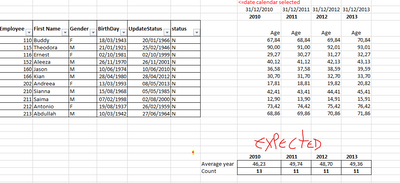
I need help in dax powerbi to get the number of active employees (Status="N") and the average age of employees per year.
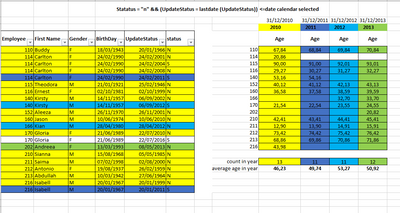
Taking into account the update date (UpdateStatus) <= dCalendar[date] && Status="N".
Note: Only calculate if UpdateStatus = LastDate and Status = "N"
its not works
sample bd
| Employee | First Name | Gender | BirthDay | UpdateStatus | status |
| 110 | Buddy | F | 18/03/1943 | 20/01/1966 | N |
| 114 | Carlton | F | 24/02/1990 | 24/02/2001 | N |
| 114 | Carlton | F | 24/02/1990 | 24/02/2004 | S |
| 114 | Carlton | F | 24/02/1990 | 24/02/2008 | N |
| 114 | Carlton | F | 24/02/1990 | 24/02/2011 | S |
| 115 | Theodora | M | 21/01/1921 | 25/02/1946 | N |
| 116 | Ernest | F | 02/10/1981 | 02/10/1999 | N |
| 140 | Kirsty | M | 14/11/1957 | 06/09/2002 | N |
| 140 | Kirsty | M | 14/11/1957 | 06/09/2012 | S |
| 152 | Aleeza | M | 26/11/1970 | 26/11/2001 | N |
| 160 | Jason | M | 10/06/1974 | 10/06/2010 | N |
| 166 | Kian | M | 28/04/1980 | 28/04/2012 | N |
| 170 | Gloria | F | 21/06/1989 | 22/07/2010 | N |
| 170 | Gloria | F | 21/06/1989 | 22/07/2016 | S |
| 202 | Andreea | F | 13/03/1993 | 08/05/2013 | N |
| 210 | Sianna | M | 15/08/1968 | 05/05/1985 | N |
| 211 | Saima | M | 07/02/1998 | 02/08/2000 | N |
| 212 | Antonio | F | 19/08/1937 | 26/02/1959 | N |
| 213 | Abdullah | M | 10/03/1942 | 27/06/1964 | N |
| 216 | Isabell | M | 20/01/1967 | 20/01/1999 | N |
| 216 | Isabell | M | 20/01/1967 | 20/01/2011 | S |
Dear friend,
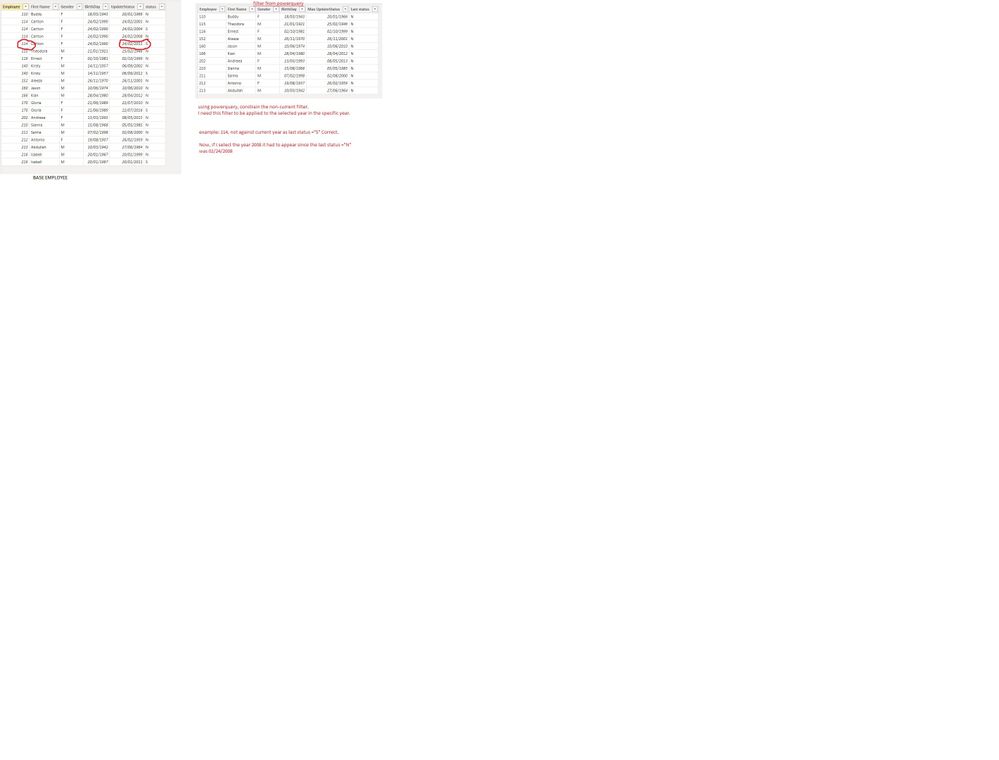
With the power query I am restricted and I can only bring information to the present day.
I need to bring it temporally, that is, if I select a year in the data segmentation [year] and show me the amount and average age of those employees who have UpdateStatus =Lastdate(UpdateStatus) && Status ="N" as shown in example in the image.
I know it seems easy for many, but I couldn't solve it, please help me!!!
Hi, @Lucianovaz
It is recommended to preprocess the data in PQ and then use dax to calculate the result.
let
Source = Table.FromRows(Json.Document(Binary.Decompress(Binary.FromText("nZNNT8MwDIb/S8+TaqdJ2hwHAgQILuM27ZCpkVaptFK7Hcavx06aLHCiSK1qq37y+iv7fYEIxaa4u7Ttlb6P9GJTQlWikRU5AkpAcrQm5704bJiQZN/bqT+Pw8IIWYKgMAPJEQD4D4bjdiuZZr0OYqajyP44ubEdJ0vmG8dhqFtwnFDhBJk3ge2HaXDzedHhEKCoBjPHmBsiOYHXbprP10UFZYmsompGdAmGyxGrERS3ahTb2965r1SLDkgNyfk5HM0/XuzsW+ZFaOqaCZkcEoGM0D4vGwFBOyO5dkjOktUCeO2nfpw6G8eCQaPhDglRQv1L46+ITrUL37rt0E7ORQarsM2GtxkoM8VMlWSEl9xRKUPsF9K4G9553iuKp4c0VYb45bHdZyQokbBiTRg94dRhyIiQGC1lN8bETFCp6jAVf4AyGcNJbo/tpe/tKRuMv5t8nqhDO7TMIO7G82yPru/jbOIVrjPHmLXM7c4cvgE=", BinaryEncoding.Base64), Compression.Deflate)), let _t = ((type nullable text) meta [Serialized.Text = true]) in type table [Employee = _t, #"First Name" = _t, Gender = _t, BirthDay = _t, UpdateStatus = _t, status = _t]),
#"Changed Type with Locale" = Table.TransformColumnTypes(Source, {{"BirthDay", type date}, {"UpdateStatus", type date}}, "en-GB"),
#"Grouped Rows" = Table.Group(#"Changed Type with Locale", {"Employee", "First Name", "Gender", "BirthDay"}, {{"SubTable", each _, type table [Employee=nullable number, First Name=nullable text, Gender=nullable text, BirthDay=nullable text, UpdateStatus=nullable text, status=nullable text]}}),
#"Aggregated SubTable" = Table.AggregateTableColumn(#"Grouped Rows", "SubTable", {{"UpdateStatus", List.Last, "Max UpdateStatus"}, {"status", List.Last, "Last status"}}),
#"Changed Type1" = Table.TransformColumnTypes(#"Aggregated SubTable",{{"Max UpdateStatus", type date}}),
#"Filtered Rows" = Table.SelectRows(#"Changed Type1", each ([Last status] = "N"))
in
#"Filtered Rows"
Best Regards,
Community Support Team _ Eason
example: 114, not against current year as last status ="S" Correct.
Now, if I select the year 2008 it had to appear since the last status ="N" was 02/24/2008
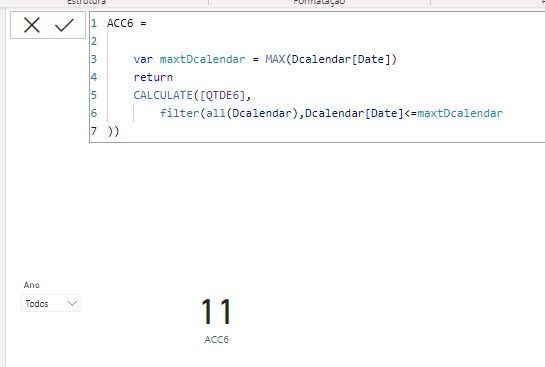
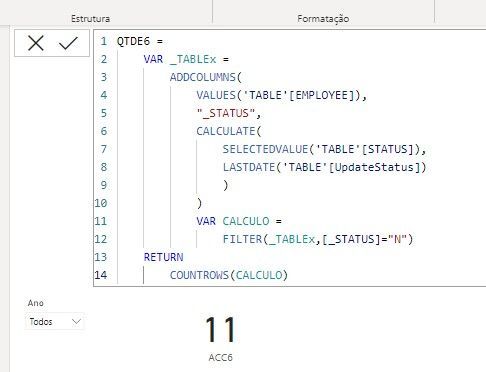
I created a measure [QTDE6] with addcolumns, the count worked, but I don't know if there is another cleaner way to count.
And another thing I need to calculate the age of these employees that were filtered and then do an average age. Please help me !!!
Check out the November 2025 Power BI update to learn about new features.
Advance your Data & AI career with 50 days of live learning, contests, hands-on challenges, study groups & certifications and more!
| User | Count |
|---|---|
| 58 | |
| 45 | |
| 42 | |
| 20 | |
| 18 |
| User | Count |
|---|---|
| 171 | |
| 110 | |
| 91 | |
| 55 | |
| 45 |