Don't miss your chance to take the Fabric Data Engineer (DP-600) exam for FREE! Find out how by attending the DP-600 session on April 23rd (pacific time), live or on-demand.
Learn moreNext up in the FabCon + SQLCon recap series: The roadmap for Microsoft SQL and Maximizing Developer experiences in Fabric. All sessions are available on-demand after the live show. Register now
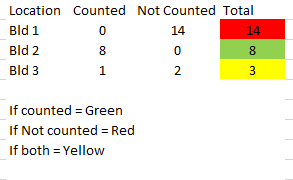
Hello, I need to set conditional format to show 3 different colors as shown below in a small sample data but cannot figure out how to do it in Power BI. Can someone please help? Thanks in advance for your time.
Solved! Go to Solution.
@tracyhopaulson, try this measure:
Formatting Color =
SWITCH (
TRUE (),
[Counted] = 0
&& [Not Counted] > 0, "Red",
[Counted] > 0
&& [Not Counted] = 0, "Green",
[Counted] > 0
&& [Not Counted] > 0, "Yellow"
)
Steps to apply:
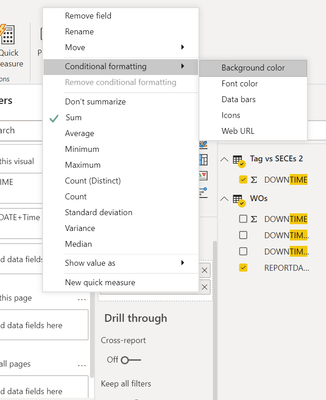
1. Conditional formatting > Background color
2. Format by = Field value
3. Based on field = Formatting Color
Instead of the color names, you can use color codes (e.g., #FF0000).
Proud to be a Super User!
@tracyhopaulson You can click the down arrow button on the required field and then select Conditional Formatting for defining formatting as per your requirement.
Here is a detailed article if you want to learn different ways: https://www.mssqltips.com/sqlservertip/6265/power-bi-conditional-formatting-for-matrix-and-table-vis...
If this post helps then please consider Accept it as the solution to help the other members find it more quickly.
Cheers!
@tracyhopaulson, try this measure:
Formatting Color =
SWITCH (
TRUE (),
[Counted] = 0
&& [Not Counted] > 0, "Red",
[Counted] > 0
&& [Not Counted] = 0, "Green",
[Counted] > 0
&& [Not Counted] > 0, "Yellow"
)
Steps to apply:
1. Conditional formatting > Background color
2. Format by = Field value
3. Based on field = Formatting Color
Instead of the color names, you can use color codes (e.g., #FF0000).
Proud to be a Super User!
Thank you so much! This works 🙂
If you have recently started exploring Fabric, we'd love to hear how it's going. Your feedback can help with product improvements.
A new Power BI DataViz World Championship is coming this June! Don't miss out on submitting your entry.
| User | Count |
|---|---|
| 46 | |
| 43 | |
| 39 | |
| 19 | |
| 15 |
| User | Count |
|---|---|
| 68 | |
| 67 | |
| 31 | |
| 27 | |
| 24 |