cancel
Showing results for 
Search instead for 
Did you mean: 

Learn from the best! Meet the four finalists headed to the FINALS of the Power BI Dataviz World Championships! Register now

Reply
Anonymous
Not applicable

conditional formating - strange behavior

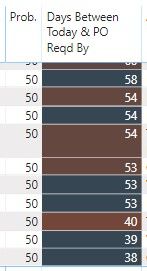
I have a calculated column that just takes the difference of today's data and another date.   The output of which is the number of days shown in the 2nd column below.    I have a divergent conditional format applied, but for some reason, I get different colors even when the values are exactly the same  (and the respective dates are also the same).  


And the conditional color does not seem to apply consistently down the data series.   You can see below that the 58 is blue, then a dark red 54...followed by a dark blue 54...then another dark red 54, etc.... 


Any idea why this is happening?  


PO.jpg

2 REPLIES 2
JarroVGIT
Resident Rockstar
Resident Rockstar

Can you share your pbix so we can reproduce the issue? Please remove sensitive data.


Did I answer your question? Mark my post as a solution!

Proud to be a Super User!


Anonymous
Not applicable

Hello,

Unfortunately it's not easy to change my file and send to you. 


However, I did change the conditional from summing to instead using an average.   This seems to have fixed the problem, although I still don't know why it does that if I use "sum".  


But thank you!

Helpful resources

Announcements
Power BI DataViz World Championships carousel

Power BI DataViz World Championships - June 2026

A new Power BI DataViz World Championship is coming this June! Don't miss out on submitting your entry.

Join our Fabric User Panel

Join our Fabric User Panel

Share feedback directly with Fabric product managers, participate in targeted research studies and influence the Fabric roadmap.

March Power BI Update Carousel

Power BI Community Update - March 2026

Check out the March 2026 Power BI update to learn about new features.