This time we’re going bigger than ever. Fabric, Power BI, SQL, AI and more. We're covering it all. You won't want to miss it.
Learn moreLevel up your Power BI skills this month - build one visual each week and tell better stories with data! Get started
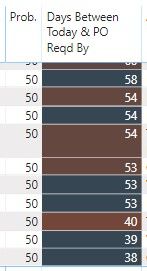
I have a calculated column that just takes the difference of today's data and another date. The output of which is the number of days shown in the 2nd column below. I have a divergent conditional format applied, but for some reason, I get different colors even when the values are exactly the same (and the respective dates are also the same).
And the conditional color does not seem to apply consistently down the data series. You can see below that the 58 is blue, then a dark red 54...followed by a dark blue 54...then another dark red 54, etc....
Any idea why this is happening?
Proud to be a Super User!
Hello,
Unfortunately it's not easy to change my file and send to you.
However, I did change the conditional from summing to instead using an average. This seems to have fixed the problem, although I still don't know why it does that if I use "sum".
But thank you!
Check out the April 2026 Power BI update to learn about new features.
Sign up to receive a private message when registration opens and key events begin.
If you have recently started exploring Fabric, we'd love to hear how it's going. Your feedback can help with product improvements.
| User | Count |
|---|---|
| 36 | |
| 28 | |
| 28 | |
| 21 | |
| 18 |
| User | Count |
|---|---|
| 68 | |
| 39 | |
| 33 | |
| 24 | |
| 23 |