This time we’re going bigger than ever. Fabric, Power BI, SQL, AI and more. We're covering it all. You won't want to miss it.
Learn moreDid you hear? There's a new SQL AI Developer certification (DP-800). Start preparing now and be one of the first to get certified. Register now
Hi All,
I have a table in CSV file. The table in CSV file will upload to PBI. The table as below :
| Purch.Doc. | Vendor Name | Scheduled Qty |
| 554321 | MyApps SDN BHD | 120 |
| 554321 | MyApps SDN BHD | 225 |
| 554322 | Abu Munawer SDN BHD | 1000 |
| 554322 | Abu Munawer SDN BHD | 1640 |
My question can PBI combine the rows that have same Purch.Doc number?
Then sum the total for Schedule Qty that have same Purch.Doc?
At the end, the table display like this :
| Purch.Doc. | Vendor Name | Scheduled Qty |
| 554321 | MyApps SDN BHD | 345 |
| 554322 | Abu Munawer SDN BHD | 2640 |
Solved! Go to Solution.
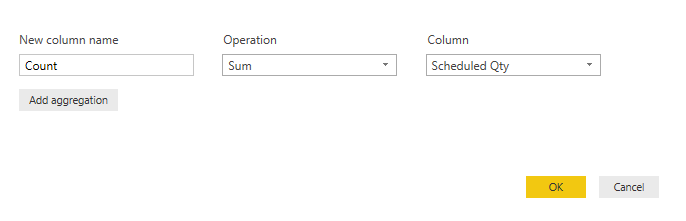
The relevant information is outside your screenshot.
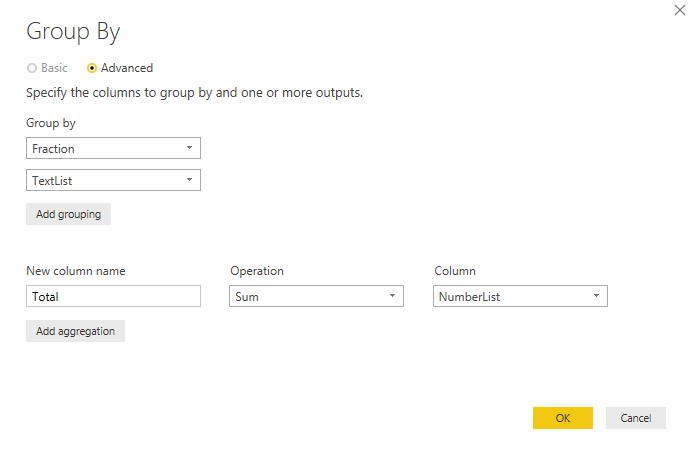
Below just an arbitrary example with grouping on 2 fields which must be under the "Goup By" section of the screen.
In "Edit Queries", go to the "Transform" tab, select your first 2 columns, choose "Group By" and fill out the fields, such that the quantities will be summed.
Thank for your reply, but when i try to use Group By method, the vendor name column missing. I need to display vendor name, Why?
Probably you didn't select both the Purch.Doc. and the Vendor Name columns before you chose "Group By".
oh, you are correct. Ok after i already select, what input should i put in the box?
How the query will know for the same Purch.Doc?
The relevant information is outside your screenshot.
Below just an arbitrary example with grouping on 2 fields which must be under the "Goup By" section of the screen.
Thanks a lot for helping me. Now i got the idea and solution to solve this problem..tq!![]()
Check out the April 2026 Power BI update to learn about new features.
Sign up to receive a private message when registration opens and key events begin.
If you have recently started exploring Fabric, we'd love to hear how it's going. Your feedback can help with product improvements.
| User | Count |
|---|---|
| 34 | |
| 31 | |
| 25 | |
| 20 | |
| 16 |
| User | Count |
|---|---|
| 61 | |
| 49 | |
| 28 | |
| 23 | |
| 23 |