cancel
Showing results for 
Search instead for 
Did you mean: 

We've captured the moments from FabCon & SQLCon that everyone is talking about, and we are bringing them to the community, live and on-demand. Starts on April 14th. Register now

Reply
melina
Helper IV
Helper IV

combine data

Hi All,


I have a table in CSV file. The table in CSV file will upload to PBI. The table as below :


Purch.Doc.Vendor NameScheduled Qty
554321MyApps SDN BHD120
554321MyApps SDN BHD225
554322Abu Munawer SDN BHD1000
554322Abu Munawer SDN BHD1640


My question can PBI combine the rows that have same Purch.Doc number?

Then sum the total for Schedule Qty that have same Purch.Doc?


At the end, the table display like this :

Purch.Doc.Vendor NameScheduled Qty
554321MyApps SDN BHD345
554322Abu Munawer SDN BHD2640
1 ACCEPTED SOLUTION

The relevant information is outside your screenshot.


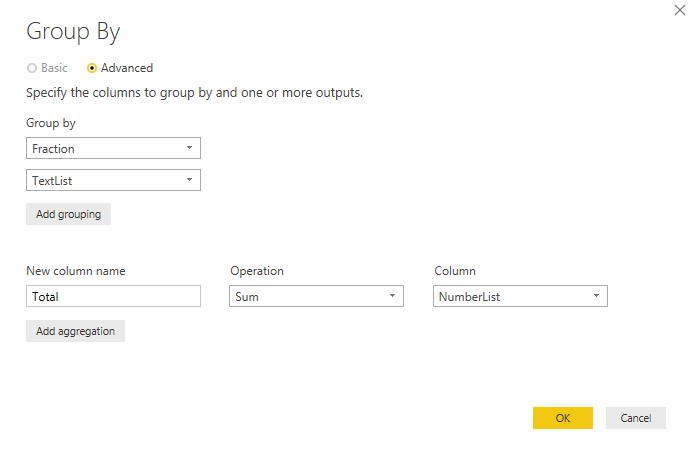
Below just an arbitrary example with grouping on 2 fields which must be under the "Goup By" section of the screen.


Group By 2.png

Specializing in Power Query Formula Language (M)

View solution in original post

6 REPLIES 6
MarcelBeug
Community Champion
Community Champion

In "Edit Queries", go to the "Transform" tab, select your first 2 columns, choose  "Group By" and fill out the fields, such that the quantities will be summed.

Specializing in Power Query Formula Language (M)

Thank for your reply, but when i try to use Group By method, the vendor name column missing. I need to display vendor name, Why?

Probably you didn't select both the Purch.Doc. and the Vendor Name columns before you chose "Group By".

Specializing in Power Query Formula Language (M)

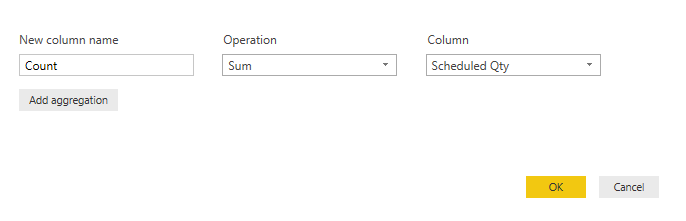
oh, you are correct. Ok after i already select, what input should i put in the box?

How the query will know for the same Purch.Doc?

Capture.PNG

The relevant information is outside your screenshot.


Below just an arbitrary example with grouping on 2 fields which must be under the "Goup By" section of the screen.


Group By 2.png

Specializing in Power Query Formula Language (M)

Thanks a lot for helping me. Now i got the idea and solution to solve this problem..tq!Smiley Happy

Helpful resources

Announcements
New to Fabric survey Carousel

New to Fabric Survey

If you have recently started exploring Fabric, we'd love to hear how it's going. Your feedback can help with product improvements.

Power BI DataViz World Championships carousel

Power BI DataViz World Championships - June 2026

A new Power BI DataViz World Championship is coming this June! Don't miss out on submitting your entry.

Join our Fabric User Panel

Join our Fabric User Panel

Share feedback directly with Fabric product managers, participate in targeted research studies and influence the Fabric roadmap.

March Power BI Update Carousel

Power BI Community Update - March 2026

Check out the March 2026 Power BI update to learn about new features.