Join us at FabCon Atlanta from March 16 - 20, 2026, for the ultimate Fabric, Power BI, AI and SQL community-led event. Save $200 with code FABCOMM.
Register now!The Power BI Data Visualization World Championships is back! It's time to submit your entry. Live now!
I have a simple clustered bar chart with two data values (male, female), one axis (site) and no legend.
I'm not sure how to insert a picture of it here so I will attempt to describe it:
on the left hand side is "site" plus the various sites;
on the bottom is "male" and "female" i.e. the data values.
I have several similar charts on the same tile and it is indicated elsewhere that male and female are colour-coordinated. I therefore do not need the data values listed at the bottom of the chart.
Is there any way of removing them?
Solved! Go to Solution.
@AJPF - I think you dont want the title of X-axis of your chart.
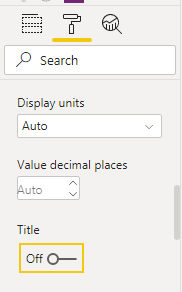
After selecting the chart, go to format tab in visualisation tab and then expand X-axis and turn off title
Appreciate your kudos!! Mark this post as solution if this helps.
@AJPF - I think you dont want the title of X-axis of your chart.
After selecting the chart, go to format tab in visualisation tab and then expand X-axis and turn off title
Appreciate your kudos!! Mark this post as solution if this helps.
| User | Count |
|---|---|
| 51 | |
| 40 | |
| 35 | |
| 23 | |
| 22 |
| User | Count |
|---|---|
| 133 | |
| 99 | |
| 57 | |
| 39 | |
| 38 |