This time we’re going bigger than ever. Fabric, Power BI, SQL, AI and more. We're covering it all. You won't want to miss it.
Learn moreDid you hear? There's a new SQL AI Developer certification (DP-800). Start preparing now and be one of the first to get certified. Register now
I have a simple clustered bar chart with two data values (male, female), one axis (site) and no legend.
I'm not sure how to insert a picture of it here so I will attempt to describe it:
on the left hand side is "site" plus the various sites;
on the bottom is "male" and "female" i.e. the data values.
I have several similar charts on the same tile and it is indicated elsewhere that male and female are colour-coordinated. I therefore do not need the data values listed at the bottom of the chart.
Is there any way of removing them?
Solved! Go to Solution.
@AJPF - I think you dont want the title of X-axis of your chart.
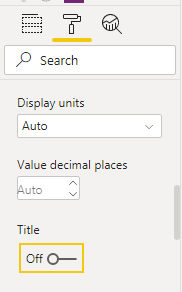
After selecting the chart, go to format tab in visualisation tab and then expand X-axis and turn off title
Appreciate your kudos!! Mark this post as solution if this helps.
@AJPF - I think you dont want the title of X-axis of your chart.
After selecting the chart, go to format tab in visualisation tab and then expand X-axis and turn off title
Appreciate your kudos!! Mark this post as solution if this helps.
Check out the April 2026 Power BI update to learn about new features.
If you have recently started exploring Fabric, we'd love to hear how it's going. Your feedback can help with product improvements.
A new Power BI DataViz World Championship is coming this June! Don't miss out on submitting your entry.
| User | Count |
|---|---|
| 38 | |
| 38 | |
| 31 | |
| 22 | |
| 15 |
| User | Count |
|---|---|
| 74 | |
| 61 | |
| 31 | |
| 31 | |
| 23 |