This is best Fabric, Power BI, SQL and AI community event. How do we know? The last event sold out! Save €200 with code FABCMTY200.
Register nowJuly 28 - August 9 | Final Round of the Power BI Dataviz World Championships. This is your chance. Learn more
Hi,
I have a full and working report built on a live web url connection like
https://service/api/company/databoards/10=2019-01-01T00:00:00.000Z&11=2019-01-31T00:00:00.000Z
and I would like to extend the date range without having to rebuild the report as it contains various measures and DAX calculations.
Is there a way to extend the original url date range without having to re-do thew work?
Many thanks,
Solved! Go to Solution.
Hi @Anonymous
You should probably refer to change the source using parameter.
But I can’t access the link you indicated, I use below url for your reference.
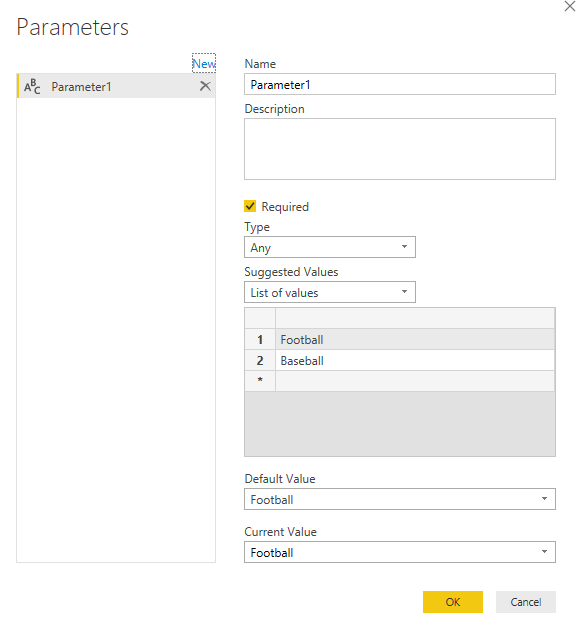
I’ve created the new parameter:
And then replace the url link with parameter:
Everytime we change the parameter, the link will be changed accordingly.
Best regards,
Dina Ye
Hi @Anonymous
You should probably refer to change the source using parameter.
But I can’t access the link you indicated, I use below url for your reference.
I’ve created the new parameter:
And then replace the url link with parameter:
Everytime we change the parameter, the link will be changed accordingly.
Best regards,
Dina Ye
Join us in Barcelona for FabCon and SQLCon, the Fabric, Power BI, SQL, and AI community event. Save €200 with code FABCMTY200.
If you love stickers, then you will definitely want to check out our community sticker challenge, Barcelona edition!
Check out the July 2026 Power BI update to learn about new features.
| User | Count |
|---|---|
| 25 | |
| 23 | |
| 19 | |
| 17 | |
| 14 |
| User | Count |
|---|---|
| 25 | |
| 23 | |
| 20 | |
| 20 | |
| 19 |