cancel
Showing results for 
Search instead for 
Did you mean: 

The Power BI Data Visualization World Championships is back! Get ahead of the game and start preparing now! Learn more

Reply
Anonymous
Not applicable

capture last month and back from a date column

Hi all,


I have a column with dates in the following format:

dd/mm/yyyy (sample data below)


How can I create a calculated column that only captures any date in last moth and backwards. All dates in current month or in future to be ignored. 


Thank you in advance.


Date column
16/12/2021
17/12/2021
18/12/2021
21/12/2021
22/12/2021
13/01/2022
14/01/2022
15/01/2022
26/01/2022
23/02/2022
24/02/2022
25/02/2022
01/03/2022
18/03/2022
22/03/2022
24/03/2022
25/03/2022
26/03/2022
28/03/2022
29/03/2022
30/03/2022
31/03/2022
01/04/2022
02/04/2022
04/04/2022
05/04/2022
06/04/2022
07/04/2022
08/04/2022
09/04/2022
16/12/2022
24/02/2023
25/02/2023
18/05/2023

05/12/2023


2 ACCEPTED SOLUTIONS
AlexisOlson
Super User
Super User

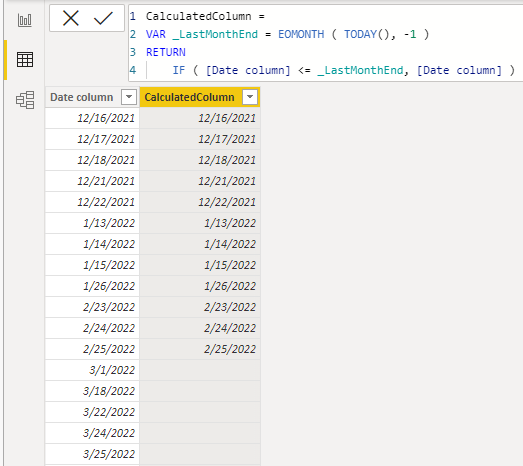
The EOMONTH function is nice here.

CalculatedColumn = 
VAR _LastMonthEnd = EOMONTH ( TODAY(), -1 )
RETURN
    IF ( [Date column] <= _LastMonthEnd, [Date column] )


AlexisOlson_0-1647541295000.png

View solution in original post

Anonymous
Not applicable

Thank you @AlexisOlson .... its working perfectly 🙂

View solution in original post

4 REPLIES 4
AlexisOlson
Super User
Super User

The EOMONTH function is nice here.

CalculatedColumn = 
VAR _LastMonthEnd = EOMONTH ( TODAY(), -1 )
RETURN
    IF ( [Date column] <= _LastMonthEnd, [Date column] )


AlexisOlson_0-1647541295000.png

Anonymous
Not applicable

Thank you @AlexisOlson .... its working perfectly 🙂

serpiva64
Solution Sage
Solution Sage

Hi,

You can obtain this

serpiva64_0-1647539692891.png

with this calculated column

Column =
var currentdate = 'Table'[Date column]
var prevmonth = date(YEAR(TODAY()),MONTH(TODAY())-1,DAY('Table'[Date column]))
var result =if (currentdate> prevmonth,"",FORMAT('Table'[Date column],"DD/MM/YYYY"))
return
result
 

If this post is useful to help you to solve your issue consider giving the post a thumbs up 

 and accepting it as a solution !


rsbin
Super User
Super User

@Anonymous 

Create a new Custom Column.  Something like this should work.

IsBeforeCurrentMonth = IF( YEAR([Date column]) <= YEAR(TODAY() ) &&
                            MONTH([Date column] ) < MONTH( TODAY() ),
                            TRUE,
                            FALSE )

Add this Column to your Filter Panel and select True.

Hope this works for you.


Helpful resources

Announcements
Power BI DataViz World Championships

Power BI Dataviz World Championships

The Power BI Data Visualization World Championships is back! Get ahead of the game and start preparing now!

November Power BI Update Carousel

Power BI Monthly Update - November 2025

Check out the November 2025 Power BI update to learn about new features.

FabCon Atlanta 2026 carousel

FabCon Atlanta 2026

Join us at FabCon Atlanta, March 16-20, for the ultimate Fabric, Power BI, AI and SQL community-led event. Save $200 with code FABCOMM.