Join us at FabCon Atlanta from March 16 - 20, 2026, for the ultimate Fabric, Power BI, AI and SQL community-led event. Save $200 with code FABCOMM.
Register now!Get Fabric Certified for FREE during Fabric Data Days. Don't miss your chance! Request now
Hi all,
I have a column with dates in the following format:
dd/mm/yyyy (sample data below)
How can I create a calculated column that only captures any date in last moth and backwards. All dates in current month or in future to be ignored.
Thank you in advance.
| Date column |
| 16/12/2021 |
| 17/12/2021 |
| 18/12/2021 |
| 21/12/2021 |
| 22/12/2021 |
| 13/01/2022 |
| 14/01/2022 |
| 15/01/2022 |
| 26/01/2022 |
| 23/02/2022 |
| 24/02/2022 |
| 25/02/2022 |
| 01/03/2022 |
| 18/03/2022 |
| 22/03/2022 |
| 24/03/2022 |
| 25/03/2022 |
| 26/03/2022 |
| 28/03/2022 |
| 29/03/2022 |
| 30/03/2022 |
| 31/03/2022 |
| 01/04/2022 |
| 02/04/2022 |
| 04/04/2022 |
| 05/04/2022 |
| 06/04/2022 |
| 07/04/2022 |
| 08/04/2022 |
| 09/04/2022 |
| 16/12/2022 |
| 24/02/2023 |
| 25/02/2023 |
| 18/05/2023 |
05/12/2023 |
Solved! Go to Solution.
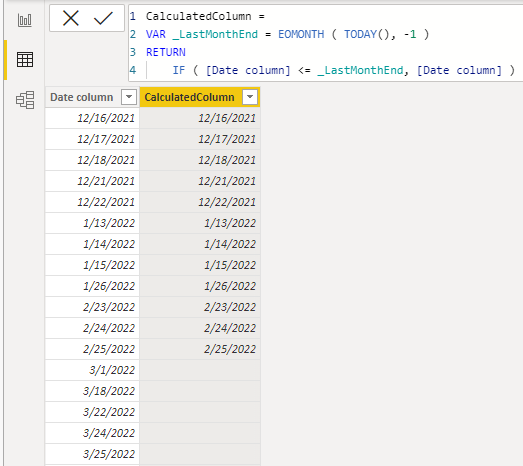
The EOMONTH function is nice here.
CalculatedColumn =
VAR _LastMonthEnd = EOMONTH ( TODAY(), -1 )
RETURN
IF ( [Date column] <= _LastMonthEnd, [Date column] )
The EOMONTH function is nice here.
CalculatedColumn =
VAR _LastMonthEnd = EOMONTH ( TODAY(), -1 )
RETURN
IF ( [Date column] <= _LastMonthEnd, [Date column] )
Hi,
You can obtain this
with this calculated column
If this post is useful to help you to solve your issue consider giving the post a thumbs up
and accepting it as a solution !
@Anonymous
Create a new Custom Column. Something like this should work.
IsBeforeCurrentMonth = IF( YEAR([Date column]) <= YEAR(TODAY() ) &&
MONTH([Date column] ) < MONTH( TODAY() ),
TRUE,
FALSE )Add this Column to your Filter Panel and select True.
Hope this works for you.
Check out the November 2025 Power BI update to learn about new features.
Advance your Data & AI career with 50 days of live learning, contests, hands-on challenges, study groups & certifications and more!