Get certified for free when you join Fabric Data Days 2026 and dive into Fabric, Power BI, SQL, AI, and other essential data skills.
Join nowData Days is here! Join us now for 60+ days of learning, challenges, and connection. Learn more
HI,
I am not sure how to get the average of a measure.
Currently: Total = count (table1[ID])
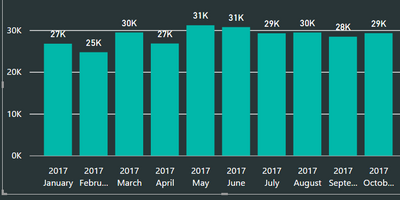
And I have the following:
I would like to get the average of the all these months to show just one number say in a KPI report: 29K
Can someone please help?
Thanks in advance.
Solved! Go to Solution.
@Anonymous
Try with:
Average = AVERAGEX(VALUES(Table1[Date].[Month]),[Total])
Regards
Victor
Hi @Anonymous,
Assuming that:
=AVERAGEX(SUMMARIZE(Calendar,Calendar[Month],"ABCD",COUNT(Table1[ID])),[ABCD])
@Anonymous
Hi, try with
Average = AVERAGEX(VALUES(Table1[Category]),[Total])
Regards
Victor
Lima - Peru
Thanks for your suggestion.
Do I have to do something with the [Category]?
My data fields are "date", ID"
So currently, the return result doesn't work out.
@Anonymous
Try with:
Average = AVERAGEX(VALUES(Table1[Date].[Month]),[Total])
Regards
Victor
Don't miss out on Data Days, June 15 through August 7. Learn Fabric, Power BI, SQL, AI and more.
Check out the May 2026 Power BI update to learn about new features.
| User | Count |
|---|---|
| 23 | |
| 23 | |
| 21 | |
| 17 | |
| 13 |
| User | Count |
|---|---|
| 58 | |
| 51 | |
| 39 | |
| 29 | |
| 24 |