Join us at FabCon Atlanta from March 16 - 20, 2026, for the ultimate Fabric, Power BI, AI and SQL community-led event. Save $200 with code FABCOMM.
Register now!The Power BI Data Visualization World Championships is back! It's time to submit your entry. Live now!
HI,
I am not sure how to get the average of a measure.
Currently: Total = count (table1[ID])
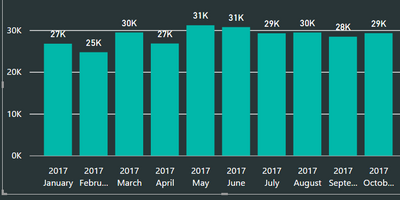
And I have the following:
I would like to get the average of the all these months to show just one number say in a KPI report: 29K
Can someone please help?
Thanks in advance.
Solved! Go to Solution.
@Anonymous
Try with:
Average = AVERAGEX(VALUES(Table1[Date].[Month]),[Total])
Regards
Victor
Hi @Anonymous,
Assuming that:
=AVERAGEX(SUMMARIZE(Calendar,Calendar[Month],"ABCD",COUNT(Table1[ID])),[ABCD])
@Anonymous
Hi, try with
Average = AVERAGEX(VALUES(Table1[Category]),[Total])
Regards
Victor
Lima - Peru
Thanks for your suggestion.
Do I have to do something with the [Category]?
My data fields are "date", ID"
So currently, the return result doesn't work out.
@Anonymous
Try with:
Average = AVERAGEX(VALUES(Table1[Date].[Month]),[Total])
Regards
Victor
The Power BI Data Visualization World Championships is back! It's time to submit your entry.
Check out the January 2026 Power BI update to learn about new features.
| User | Count |
|---|---|
| 56 | |
| 40 | |
| 38 | |
| 21 | |
| 20 |
| User | Count |
|---|---|
| 142 | |
| 105 | |
| 63 | |
| 36 | |
| 35 |