Join us at FabCon Atlanta from March 16 - 20, 2026, for the ultimate Fabric, Power BI, AI and SQL community-led event. Save $200 with code FABCOMM.
Register now!Get Fabric Certified for FREE during Fabric Data Days. Don't miss your chance! Request now
Hi, I'm trying to create a Bell Curve with an average spread along the weeks between the date range. What's the best way to do it. I'm getting my feet wet in BI and wanted to try this out.
Thanks
Solved! Go to Solution.
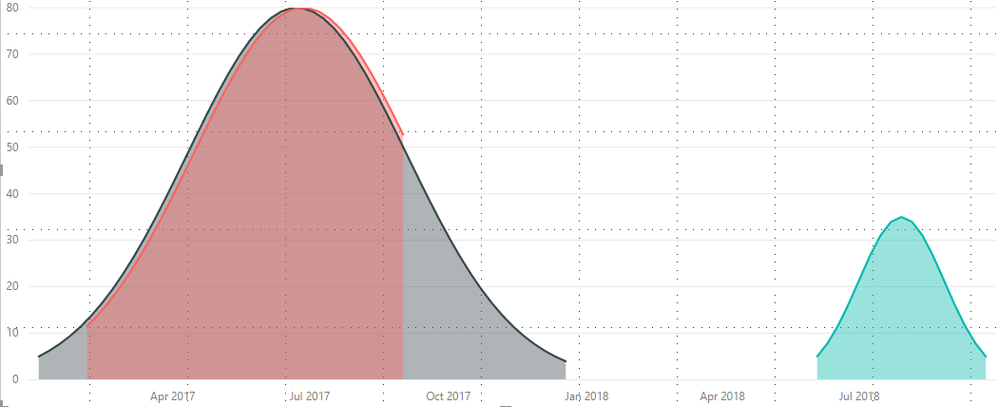
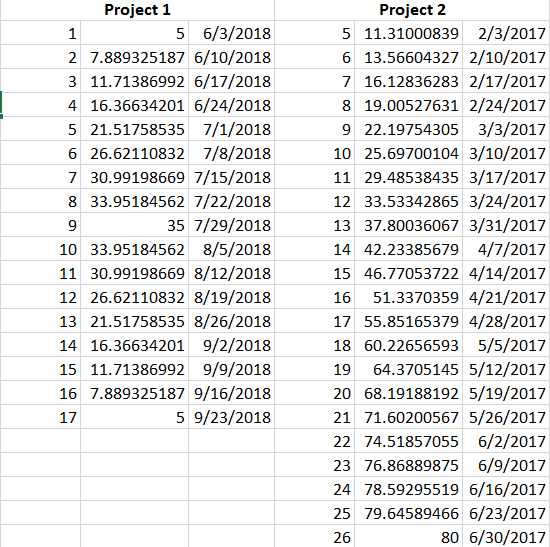
Hi, I found a way to generate the points. I used the Normal Distribution formula with some assumptions. Now visualizing them in BI is a challenge. I have different datasets for different projects and would like to show all of them overlapping in one graph. Which means there must one column with all the projects and it's Normally disributed curve points. Please see the image below. I moved the columns manually Please see image 2 for understanding how the dataset is setup.
Hi @drallam,
After search, there is a blog which describe the sample table and how to create a bell curve and histogram, please review and see: Create Bell Curve and Histogram with Power BI Desktop using DAX.
If you have your own sample data, you can share and list the expected result, we can help you to create report.
Best Regards,
Angelia
Hi, I found a way to generate the points. I used the Normal Distribution formula with some assumptions. Now visualizing them in BI is a challenge. I have different datasets for different projects and would like to show all of them overlapping in one graph. Which means there must one column with all the projects and it's Normally disributed curve points. Please see the image below. I moved the columns manually Please see image 2 for understanding how the dataset is setup.
Check out the November 2025 Power BI update to learn about new features.
Advance your Data & AI career with 50 days of live learning, contests, hands-on challenges, study groups & certifications and more!