Join us at FabCon Atlanta from March 16 - 20, 2026, for the ultimate Fabric, Power BI, AI and SQL community-led event. Save $200 with code FABCOMM.
Register now!The Power BI Data Visualization World Championships is back! Get ahead of the game and start preparing now! Learn more
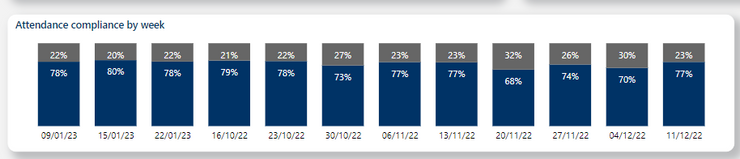
Hello I currently have a column with dates corresponding to the first day of the week. This numbers might be repeated as there are multiple orders per week. When I try to show this dates in a graph, however, the sort uses this order and I can't find a way to change it to actually chronological.
I'd like to see Oct ´22 - Nov '22 - Dec '22 - Jan '23. So pretty much what it is right now but with january last.
I even tried changing the dats to whole numbers and then sorting, same thing happened, just puts january first as if the year didn't matter.
Can anyone offer some advice please? Thanks
Solved! Go to Solution.
I actually just had to sort that date by another column. I created a column with the same date as a number and just sorted by htat one
To clarify I don't really care if the data has to be Date or Text type, it currently is date but that can be changed.
And I can´t do a sort by column on an auxiliary column because if they drill down the data that method would break, as not every item appears every week.
The Power BI Data Visualization World Championships is back! Get ahead of the game and start preparing now!
| User | Count |
|---|---|
| 41 | |
| 38 | |
| 36 | |
| 31 | |
| 28 |
| User | Count |
|---|---|
| 128 | |
| 88 | |
| 79 | |
| 68 | |
| 63 |