This is best Fabric, Power BI, SQL and AI community event. How do we know? The last event sold out! Save €200 with code FABCMTY200.
Register nowThe Fabric community is upgrading! Read all of the details including the timeline and what you can expect. Learn more
Hello,
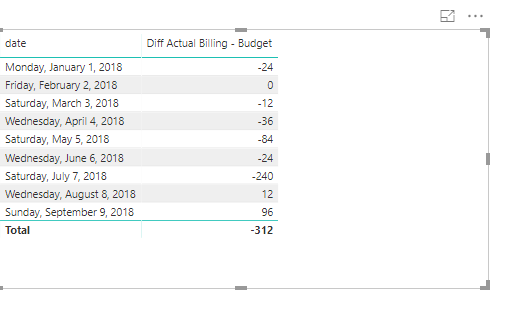
I get a wrong result in my subtotal when I utilize a variable.
I use months as a filter.
I cannot see the connection.
Diff Actual Billing - Budget =
Var DiffActualtoBudget = [Total Actual Billing] - [Total Budget]
RETURN
//DiffActualtoBudget
IF(
HASONEVALUE(dimCalendar[MonthYear]),
DiffActualtoBudget,
SUMX(
VALUES(
dimCalendar[MonthYear]),
DiffActualtoBudget))
Please see screenshot.
Thank you,
Tamir
Hi @Anonymous,
Could you please share your pbix to me so that I can help with that?
Regards,
Frank
Unfortunately, I cannot share that pbix file.
Can you see clearly the formulas or do I need write it in the thread?
Regards,
Tamir
Hi @Anonymous,
I made one sample here, However that the measure seemed worked well in my side. Could you please share your sample data to me if possible? And what are the formulas of your [Total Actual Billing] and [Total Budget]?
Attached the pbix for your reference.
https://www.dropbox.com/s/2rl06yza5z6opmg/Wrong%20Subtotal%20when%20using%20Variable.pbix?dl=0
Regards,
Frank
In some measures, I get the same result when I use the VAR expression (as expected ) and in some, I don't (in the subtotal for example).
Perhaps it has to do with the SUMX ...
Why would you wrap your simple SUM with a CALCULATE? What is the benefit of that?
Regards,
Tamir
Hi @Anonymous,
Could you please tell me what are your measures of [Total Actual Billing] and [Total Budget] and kindly share your sample data if possible?
Regards,
Frank
wefwefwef
I cannot share data.
However, I discovered the pattern of the wrong calculation and perhaps you could explain why Power BI behaves so...
Please see snapshot...
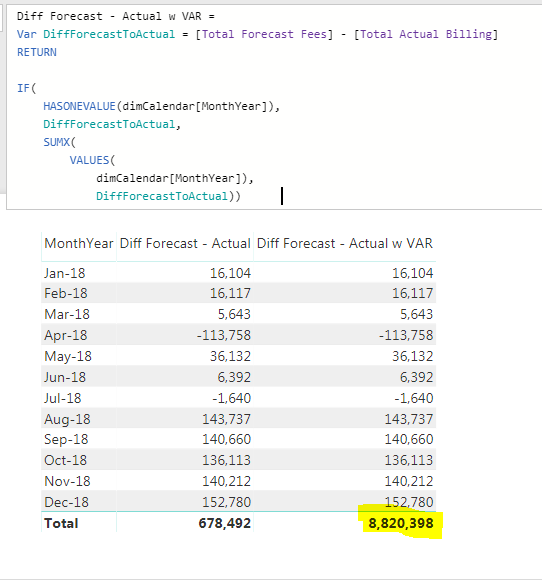
When I use the VAR expression, the Total is actually multiplied by 12.
If I choose only 3 months, it then multiplies the actual total by 3 and so on...
Something in the way that the SUMX is iterating over the VAR expression is the cause for the multiplication in the number of presented rows.
This is my workaround solution:
Diff Forecast - Actual w VAR =
Var DiffForecastToActual = [Total Forecast Fees] - [Total Actual Billing]
Var CountVisibleRows = COUNTROWS(VALUES(dimCalendar[MonthYear]))
RETURN
IF(
HASONEVALUE(dimCalendar[MonthYear]),
DiffForecastToActual,
DIVIDE(
SUMX(
VALUES(
dimCalendar[MonthYear]),
DiffForecastToActual),
CountVisibleRows) )Does that Make sense?
Regards,
Tamir
Join us in Barcelona for FabCon and SQLCon, the Fabric, Power BI, SQL, and AI community event. Save €200 with code FABCMTY200.
| User | Count |
|---|---|
| 24 | |
| 22 | |
| 20 | |
| 18 | |
| 14 |
| User | Count |
|---|---|
| 27 | |
| 22 | |
| 21 | |
| 20 | |
| 20 |