cancel
Showing results for 
Search instead for 
Did you mean: 

Learn from the best! Meet the four finalists headed to the FINALS of the Power BI Dataviz World Championships! Register now

Reply
Greger1337
Frequent Visitor

Filter X-axis

I have as measure calculating sales of last 18 months:

Volume_18M = CALCULATE([Fsg volym];FILTER(Datum;Datum[Date]>DATE(YEAR(TODAY());MONTH(TODAY())-18;DAY(TODAY()))))

In a bar chart I want to display this per month.

To show when there is Zero sales I have selescted to show values without data but this gives me an X-axis like below.


How do I filter my datetable to only show values between Today and 18 months back on X-axis?

1 ACCEPTED SOLUTION

Unfortunatley this filters the categories on my X-axis if there is no data for the Year-Month.


I managed to get it working with this measure:

Volym_18M = CALCULATE(
       IF([Fsg volym]=0 
            && (LASTDATE(Datum[Date]) > 
                 DATE(YEAR(TODAY());MONTH(TODAY())-18;DAY(TODAY())) 
                 && LASTDATE(Datum[Date]) < TODAY()) ;0;[Fsg volym]);
       FILTER(Datum;Datum[Date]>DATE(YEAR(TODAY());MONTH(TODAY())-18;DAY(TODAY()))))

View solution in original post

2 REPLIES 2
kaushikd
Resolver II
Resolver II

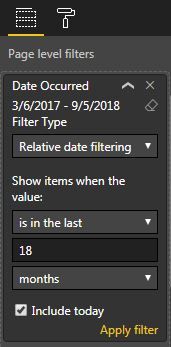
You can use the page level filter or visual level filter to get the last 18 month Volume, no need of writing dax for that. Try this and let me know if that fix your problem.


Capture.JPG

For more details you can follow this link

https://docs.microsoft.com/en-us/power-bi/desktop-slicer-filter-date-range#using-the-relative-date-r...

Unfortunatley this filters the categories on my X-axis if there is no data for the Year-Month.


I managed to get it working with this measure:

Volym_18M = CALCULATE(
       IF([Fsg volym]=0 
            && (LASTDATE(Datum[Date]) > 
                 DATE(YEAR(TODAY());MONTH(TODAY())-18;DAY(TODAY())) 
                 && LASTDATE(Datum[Date]) < TODAY()) ;0;[Fsg volym]);
       FILTER(Datum;Datum[Date]>DATE(YEAR(TODAY());MONTH(TODAY())-18;DAY(TODAY()))))

Helpful resources

Announcements
Join our Fabric User Panel

Join our Fabric User Panel

Share feedback directly with Fabric product managers, participate in targeted research studies and influence the Fabric roadmap.

February Power BI Update Carousel

Power BI Monthly Update - February 2026

Check out the February 2026 Power BI update to learn about new features.

FabCon Atlanta 2026 carousel

FabCon Atlanta 2026

Join us at FabCon Atlanta, March 16-20, for the ultimate Fabric, Power BI, AI and SQL community-led event. Save $200 with code FABCOMM.