cancel
Showing results for 
Search instead for 
Did you mean: 

July 7 - July 17 | Round 2 of the Power BI Dataviz World Championships. Don't miss your chance! Learn more

Reply
MrGriff
Frequent Visitor

Working out difference between rows

Hi, 

How do I work out the difference between rows? 
 

I have the below dataset but would like to create the column "Power Used" this would show me as below;


DateNamePowerPower Used
03/05/2021 12:38Projector19634204
03/05/2021 12:54Projector19634244
03/05/2021 13:10Projector19634283
03/05/2021 13:26Projector19634314
03/05/2021 13:42Projector19634354
03/05/2021 13:58Projector19634394
05/05/2021 04:12Computer300086917
05/05/2021 04:28Computer300088617
05/05/2021 04:44Computer300090318
05/05/2021 05:00Computer300092119
05/05/2021 05:16Computer300094017
05/05/2021 03:24Light758055521
05/05/2021 03:40Light758057625
05/05/2021 03:56Light758060123
05/05/2021 04:12Light758062423
05/05/2021 04:28Light758064723
05/05/2021 04:44Light758067021


Is there a way to do this in the M Code?


Thanks

1 ACCEPTED SOLUTION
Jihwan_Kim
Super User
Super User

Hi, @MrGriff 

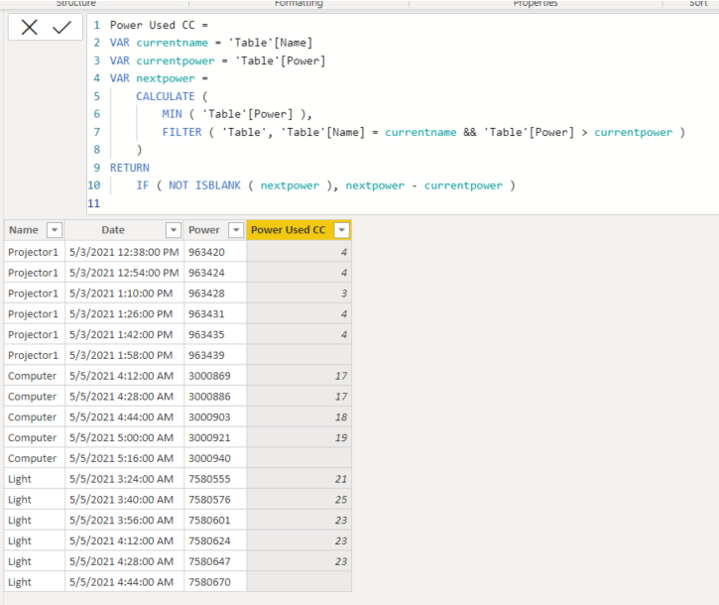
Please check the below picture and the formula for creating a new column.


Picture3.png


Power Used CC =
VAR currentname = 'Table'[Name]
VAR currentpower = 'Table'[Power]
VAR nextpower =
CALCULATE (
MIN ( 'Table'[Power] ),
FILTER ( 'Table', 'Table'[Name] = currentname && 'Table'[Power] > currentpower )
)
RETURN
IF ( NOT ISBLANK ( nextpower ), nextpower - currentpower )
 

Hi, My name is Jihwan Kim.


If this post helps, then please consider accept it as the solution to help other members find it faster, and give a big thumbs up.


Linkedin: linkedin.com/in/jihwankim1975/

Twitter: twitter.com/Jihwan_JHKIM


If this post helps, then please consider accepting it as the solution to help other members find it faster, and give a big thumbs up.


Click here to visit my LinkedIn page

View solution in original post

3 REPLIES 3
MrGriff
Frequent Visitor

MrGriff_0-1626337649373.png


Jihwan_Kim
Super User
Super User

Hi, @MrGriff 

Please check the below picture and the formula for creating a new column.


Picture3.png


Power Used CC =
VAR currentname = 'Table'[Name]
VAR currentpower = 'Table'[Power]
VAR nextpower =
CALCULATE (
MIN ( 'Table'[Power] ),
FILTER ( 'Table', 'Table'[Name] = currentname && 'Table'[Power] > currentpower )
)
RETURN
IF ( NOT ISBLANK ( nextpower ), nextpower - currentpower )
 

Hi, My name is Jihwan Kim.


If this post helps, then please consider accept it as the solution to help other members find it faster, and give a big thumbs up.


Linkedin: linkedin.com/in/jihwankim1975/

Twitter: twitter.com/Jihwan_JHKIM


If this post helps, then please consider accepting it as the solution to help other members find it faster, and give a big thumbs up.


Click here to visit my LinkedIn page

@Jihwan_Kim 

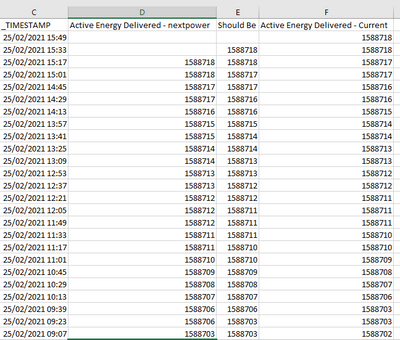
Sorry to re-open this again but I have seen that the calculation is wrong, If the current and next power are the calculation just looks a the next value that is higher in value... but really I if the value is the same the result should be 0..


If you can help that would be great

Helpful resources

Announcements
FabCon and SQLCon Barcelona 2026

FabCon & SQLCon – Barcelona 2026

Join us in Barcelona for FabCon and SQLCon, the Fabric, Power BI, SQL, and AI community event. Save €200 with code FABCMTY200.

60 days of Data Days Carousel

Data Days 2026

Join Data Days 2026: 60 days of free live/on-demand sessions, challenges, study groups, and certification opportunities.

Power BI DataViz World Championships carousel

Power BI DataViz World Championships - June 2026

A new Power BI DataViz World Championship is coming this June! Don't miss out on submitting your entry.

Top Solution Authors